Overview
Last edited
What’s the point of Kubernetes?
Pithy
K8s is a way to keep your docker containers up.
If the containers become unhealthy, k8s can take them out behind the barn and shoot them, then spin up another container(s) automatically.
It does a bunch of other cool stuff too, like load balancing and rolling deployments too.
Principals
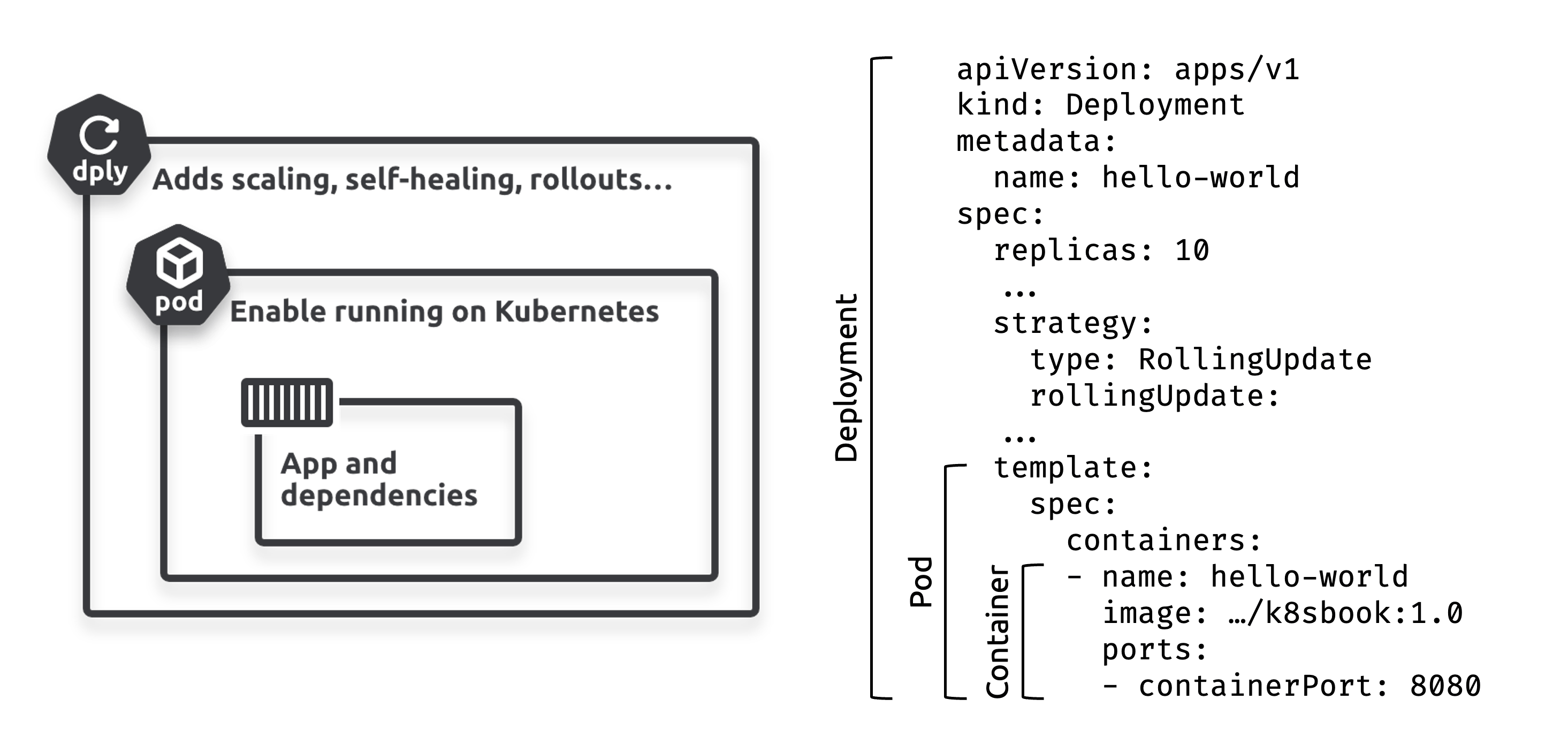
- The container wraps the app and provides dependencies
- The Pod wraps the container so it can run on Kubernetes
- The Deployment wraps the Pod and adds self-healing, scaling and more
Pods
All containers in the same Pod share the Pod’s execution environment:
- Shared filesystem and volumes (
mntnamespace) - Shared network stack (
netnamespace) - Shared memory (
IPCnamespace) - Shared process tree (
pidnamespace) - Shared hostname (
utsnamespace)
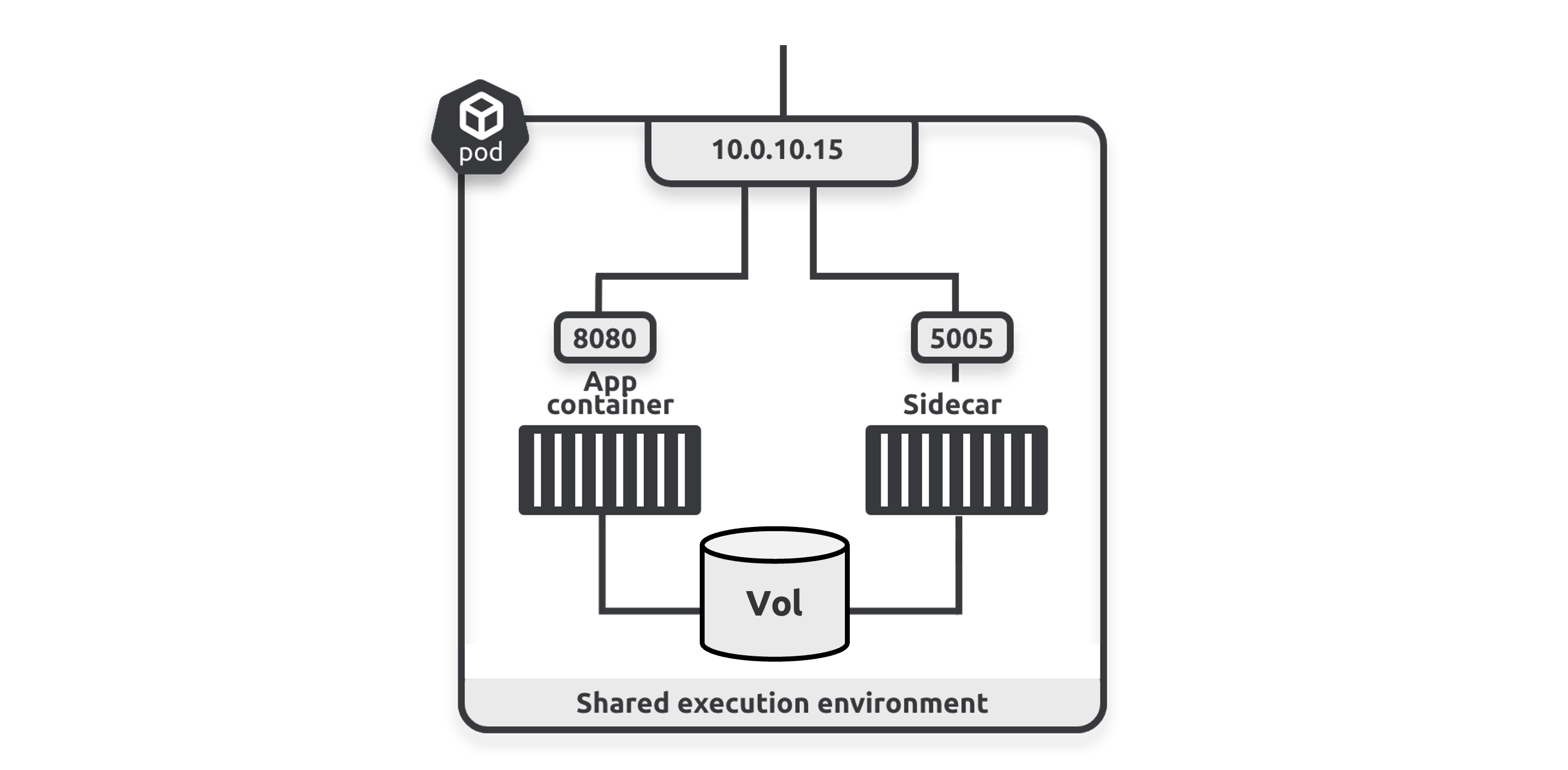
- Other apps and clients access containers via the Pod’s IP address
- The main app container is available on port
8080and the sidecar on port5005 - Containers use the Pod’s localhost adapter to communicate inside the Pod
Multi-Container Pods
spec:
  initContainers:
    image: busybox:1.28.4
  containers:
    image: nigelpoulton/web-app:1.0
  initContainers:
  - name: ctr-sync
    restartPolicy: Always # <- makes it a sidecar
Init containers run once before the main container - useful for one-time setup like cloning a repo.
Sidecars run alongside the main container:
- Start before the main container
- Keep running alongside the main container
- Terminate after the main container
Resource Requests/Limits
- Requests - minimums used for scheduling
- Limits - maximums enforced by kubelet
Pods are never allowed to use more than their limits.
resources:
  requests:
    cpu: 0.5
    memory: 256Mi
  limits:
    cpu: 1.0
    memory: 512Mi
Commands
# deploy
kubectl apply -f initpod.yml

# delete
kubectl delete pod [podname...]
kubectl delete -f [.yml files...]

# read
kubectl get pods
kubectl get pods -o wide
kubectl get pods -o yaml
kubectl describe pod hello-pod
kubectl describe pod hello-pod --container [container_name]

# interact
kubectl exec hello-pod -- ps
kubectl exec hello-pod --container [container_name] -- ps
kubectl exec -it hello-pod -- sh
    env

kubectl explain pod.spec.restartPolicy
Namespaces
Divide a cluster for resource and accounting purposes. Each namespace can have its own users, RBAC rules, resource quotas and policies.
Note
Not a strong isolation boundary, don’t use with multiple external clients.
If no namespace is provided k8s deploys to the default namespace.
apiVersion: v1
kind: Pod
metadata:
  namespace: shield
  name: triskelion
  labels:
    env: marvel
spec:
  containers:
  - image: nigelpoulton/k8sbook:shield-01
    name: bus-ctr
DNS
# /etc/resolv.conf
search dev.svc.cluster.local svc.cluster.local cluster.local pawney.net
nameserver 10.96.0.10
options ndots:5
root@jump:/# curl ent:8080
Hello from the DEV Namespace!
root@jump:/# curl ent.prod.svc.cluster.local:8080
Hello from the PROD Namespace!Question
Why does
entdefault to dev, but prod requires explicit naming?
Answer
ndots:5means if the request has fewer than 5 dots, the resolver appends each search domain in order. Sincedevis first,ent.dev.svc.cluster.localmatches first.
dns_req := ent
ndots := 5
domains_to_append := []String{"dev.svc.cluster.local, svc.cluster.local, cluster.local"}

if numOfDots(dns_req) < ndots {
    for _, domain := range domains_to_append {
        sendDNSRequest(dns_req + domain)
    }
} else {
    sendDNSRequest(dns_res)
}
Commands
kubectl get namespaces
kubectl get ns
kubectl get pods -n shield
kubectl get svc --namespace shield
kubectl get all -n dev
kubectl delete ns shield

# set default namespace
kubectl config set-context --current --namespace shield
kubectl config set-context --current --namespace default

# troubleshooting pod with networking tools
kubectl run -it dnsutils \\
  --image registry.k8s.io/e2e-test-images/jessie-dnsutils:1.7
kubectl exec -it dnsutils -- bash
Deployments
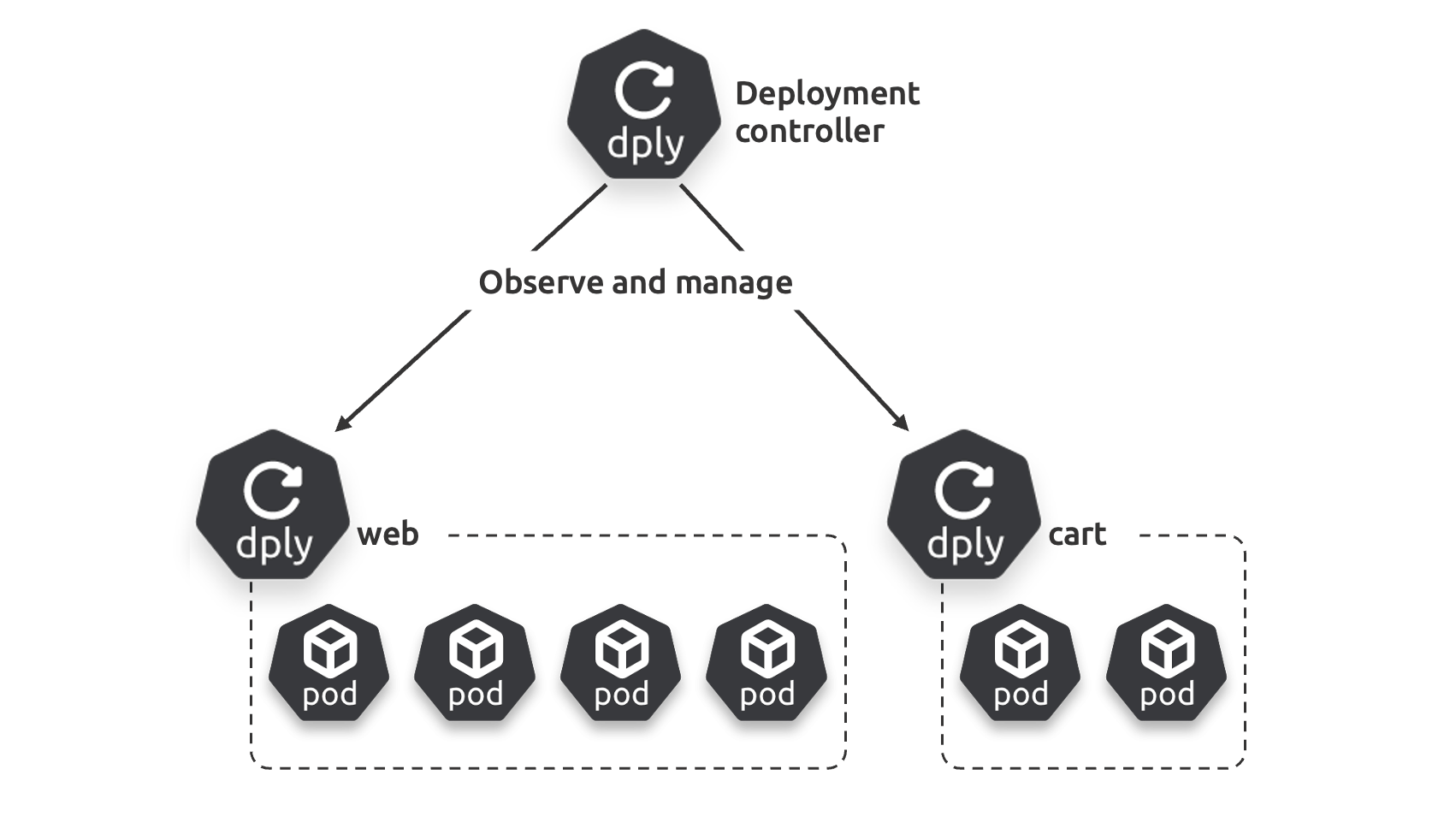
Every Deployment manages one or more identical Pods.
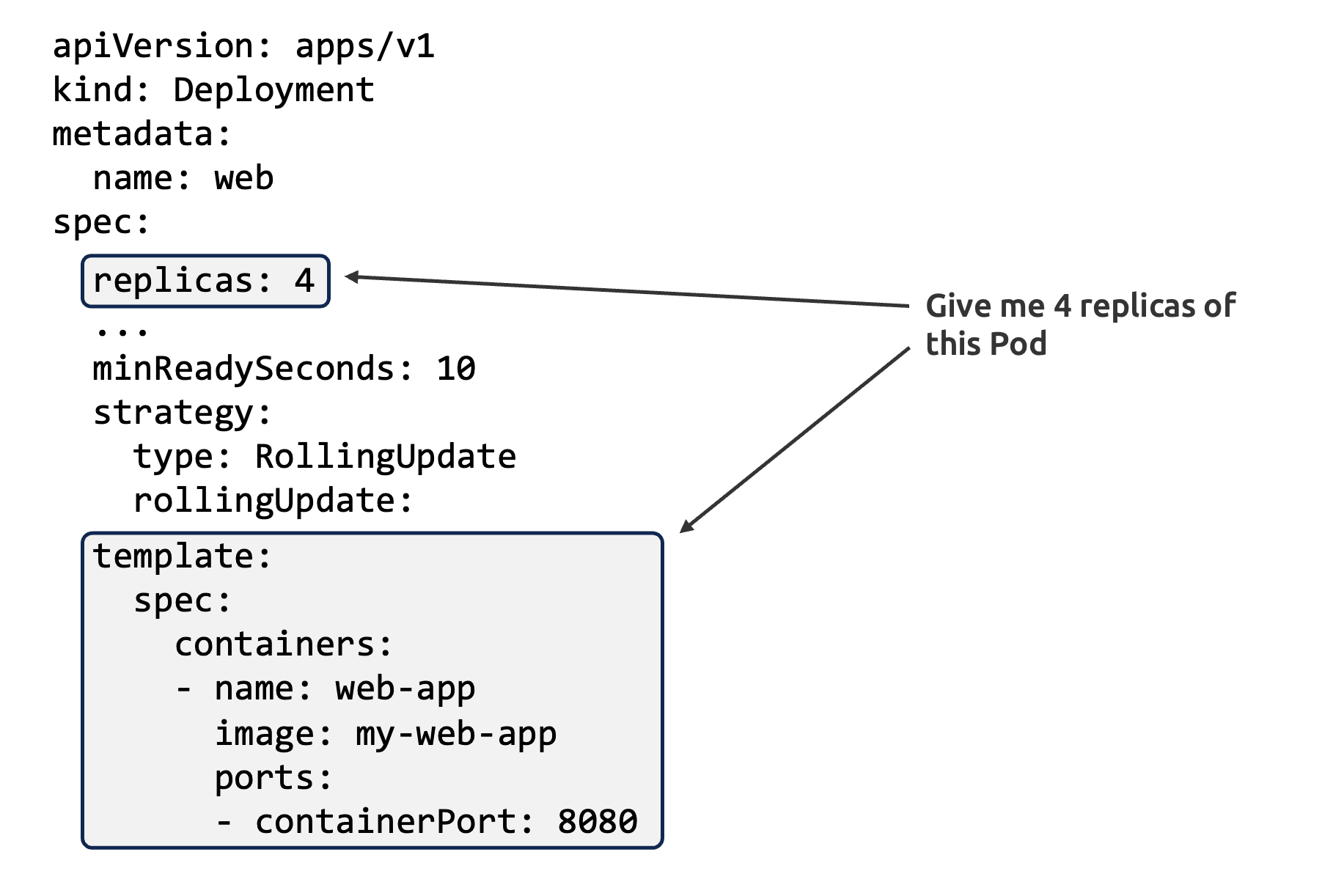
Rollouts
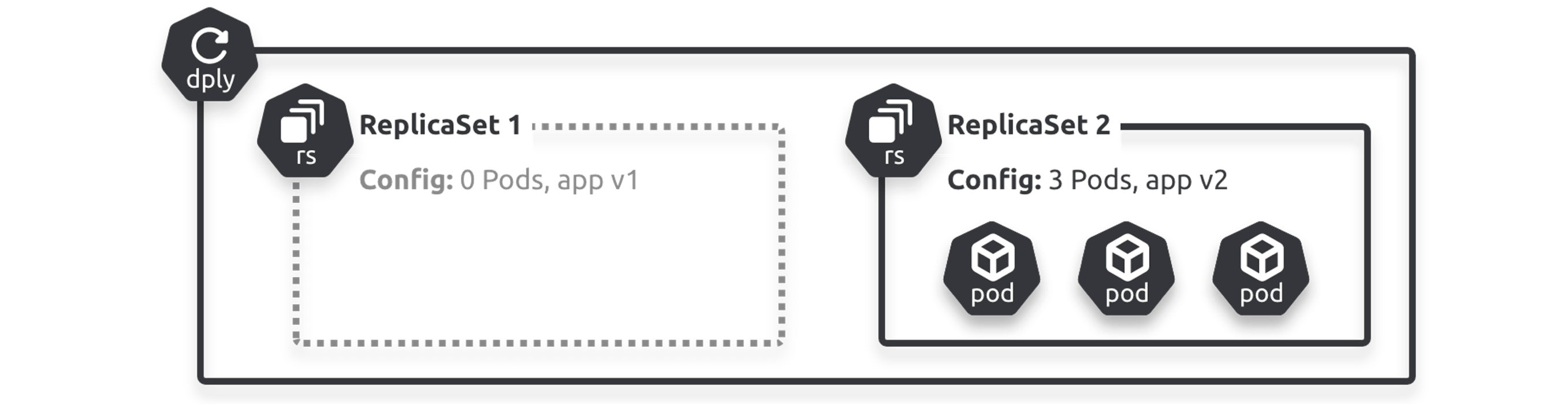
Zero-downtime update process:
- Update Deployment YAML with new Pod spec
- Observed state (
5 old Pods) no longer matches desired state (5 new Pods) - Deployment controller creates a new ReplicaSet for the new version
- New ReplicaSet scales up while old one scales down
Rollbacks
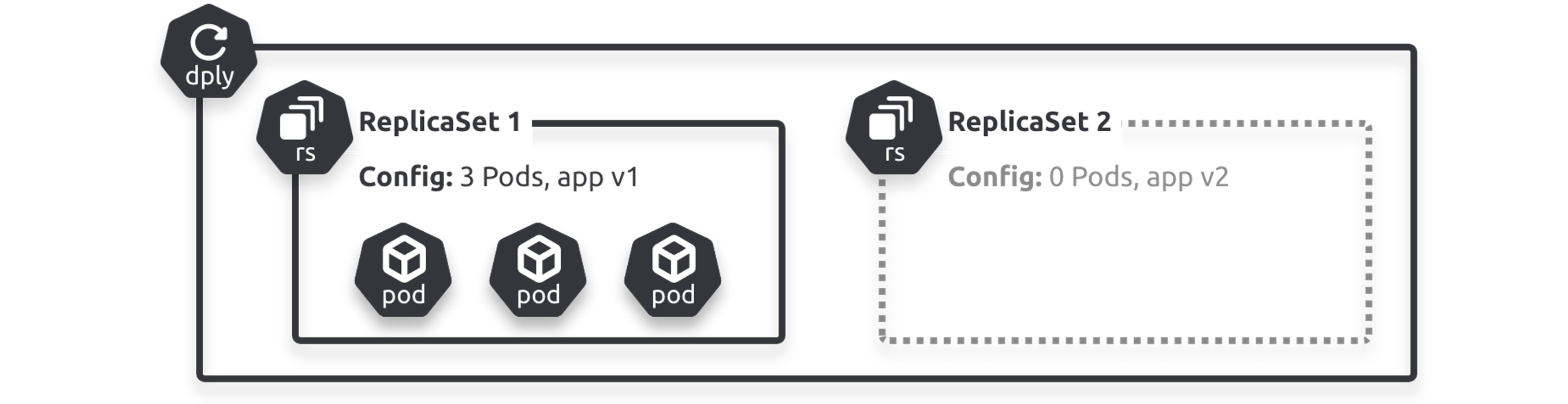
Rollbacks reverse the rollout process.
Commands
kubectl get deploy hello-deploy
kubectl get rs

kubectl scale deploy hello-deploy --replicas 5
kubectl apply -f deploy.yml

kubectl rollout status deployment hello-deploy
kubectl rollout pause deploy hello-deploy
kubectl rollout resume deploy hello-deploy
kubectl rollout history deployment hello-deploy
kubectl rollout undo deployment hello-deploy --to-revision=1
Services
Pods are not reliable - Service objects sit in front of Pods and expose them via a stable DNS name, IP and port.
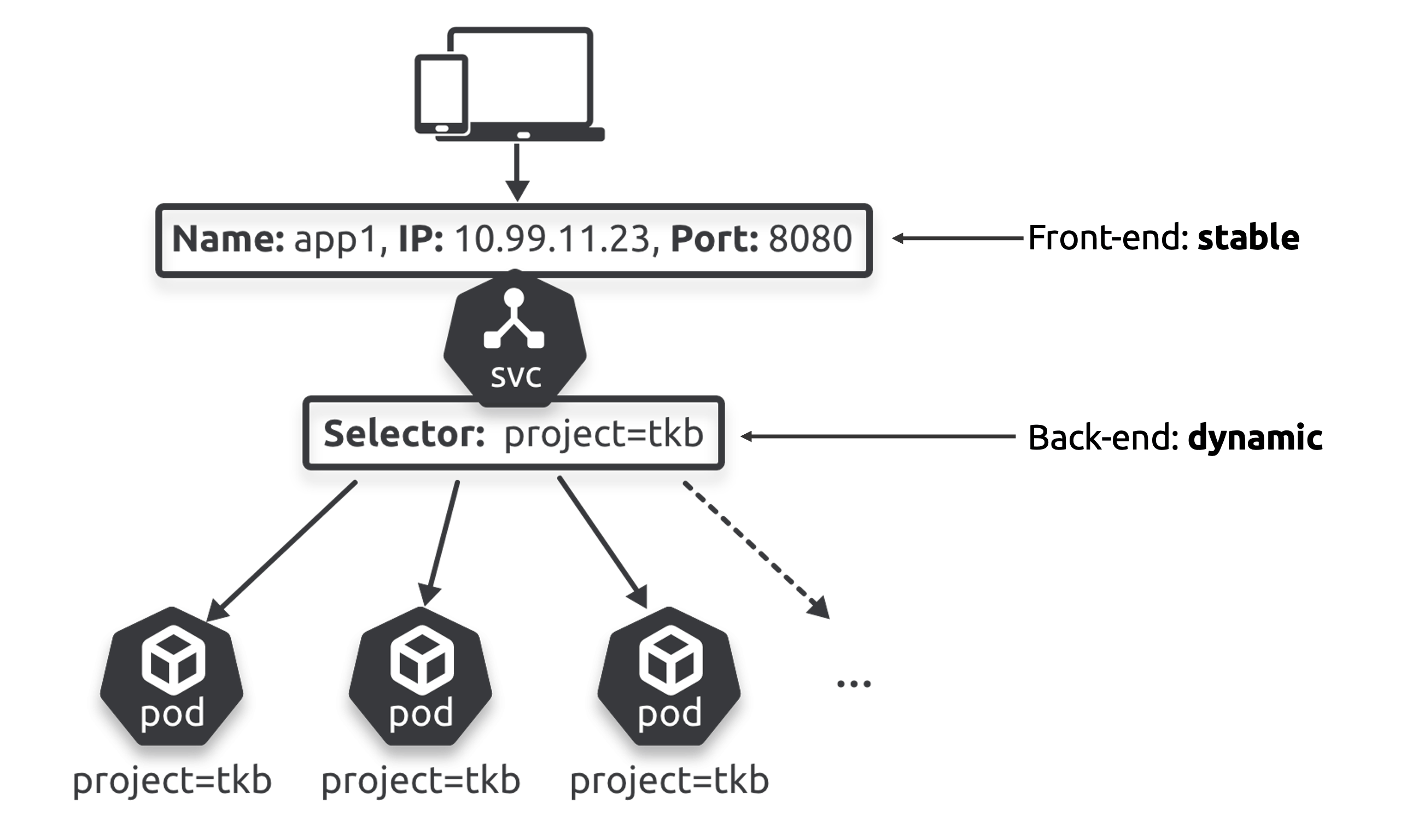
- The front end (DNS name, IP, port) never changes
- The back end is a label selector that routes to healthy Pods with matching labels
Types
ClusterIP- stable endpoint on the internal Pod networkNodePort- builds on ClusterIP, allows external access via a port on every cluster nodeLoadBalancer- builds on NodePort, integrates with cloud load balancers
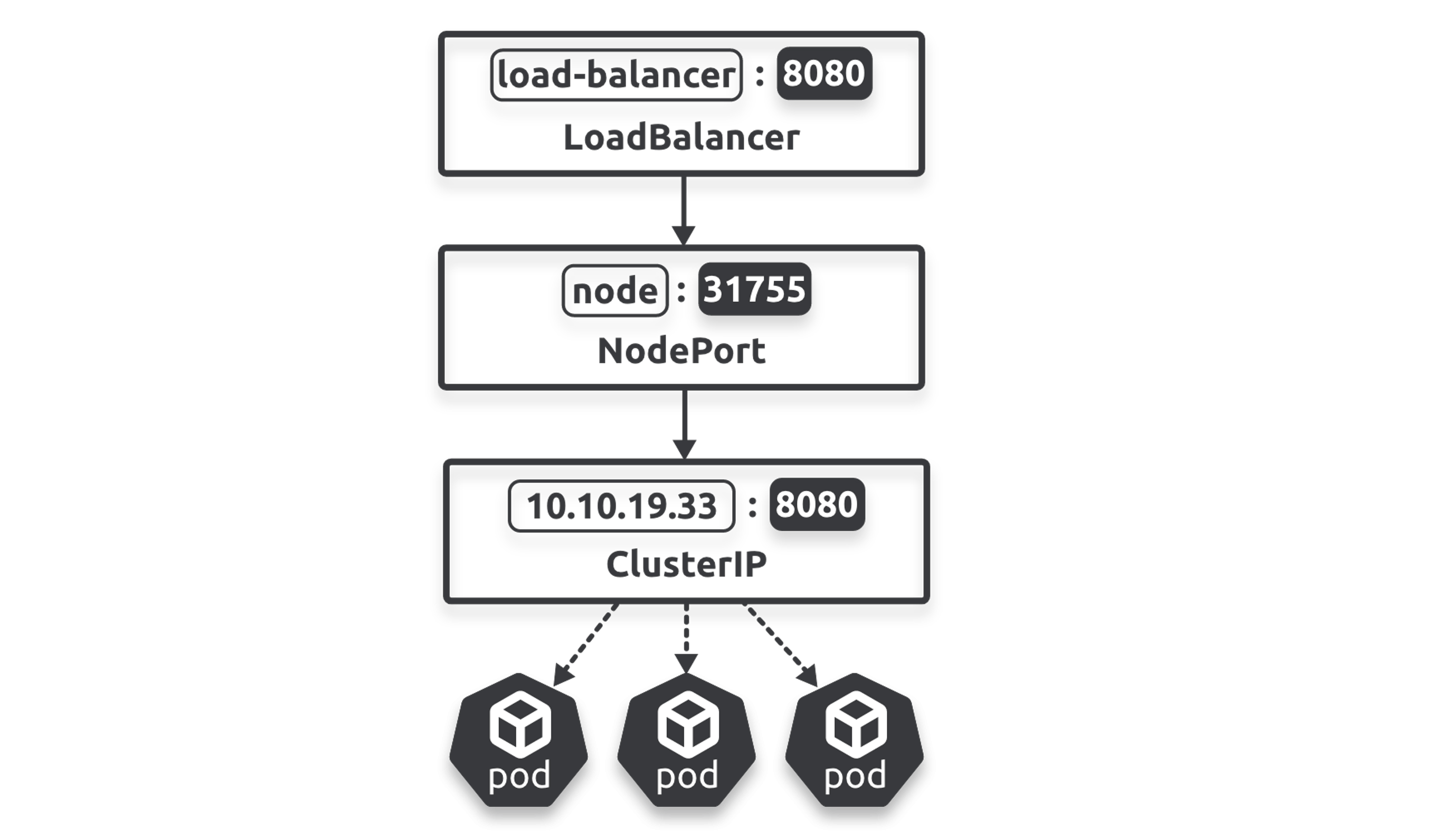
kubectl describe svc svc-test
# Type:       LoadBalancer
# Port:       8080/TCP
# TargetPort: 8080/TCP
# NodePort:   31882/TCP
# Endpoints:  10.244.0.59:8080,10.244.0.62:8080,...
Labels & Loose Coupling
apiVersion: apps/v1
kind: Deployment
metadata:
  name: tkb-2024
spec:
  replicas: 10
  template:
    metadata:
      labels:
        project: tkb        ----┐  Create Pods
        zone: prod          ----┘  with these labels
    spec:
      containers:
---
apiVersion: v1
kind: Service
metadata:
  name: tkb
spec:
  ports:
  - port: 8080
  selector:
    project: tkb            ----┐ Send to Pods
    zone: prod              ----┘ with these labels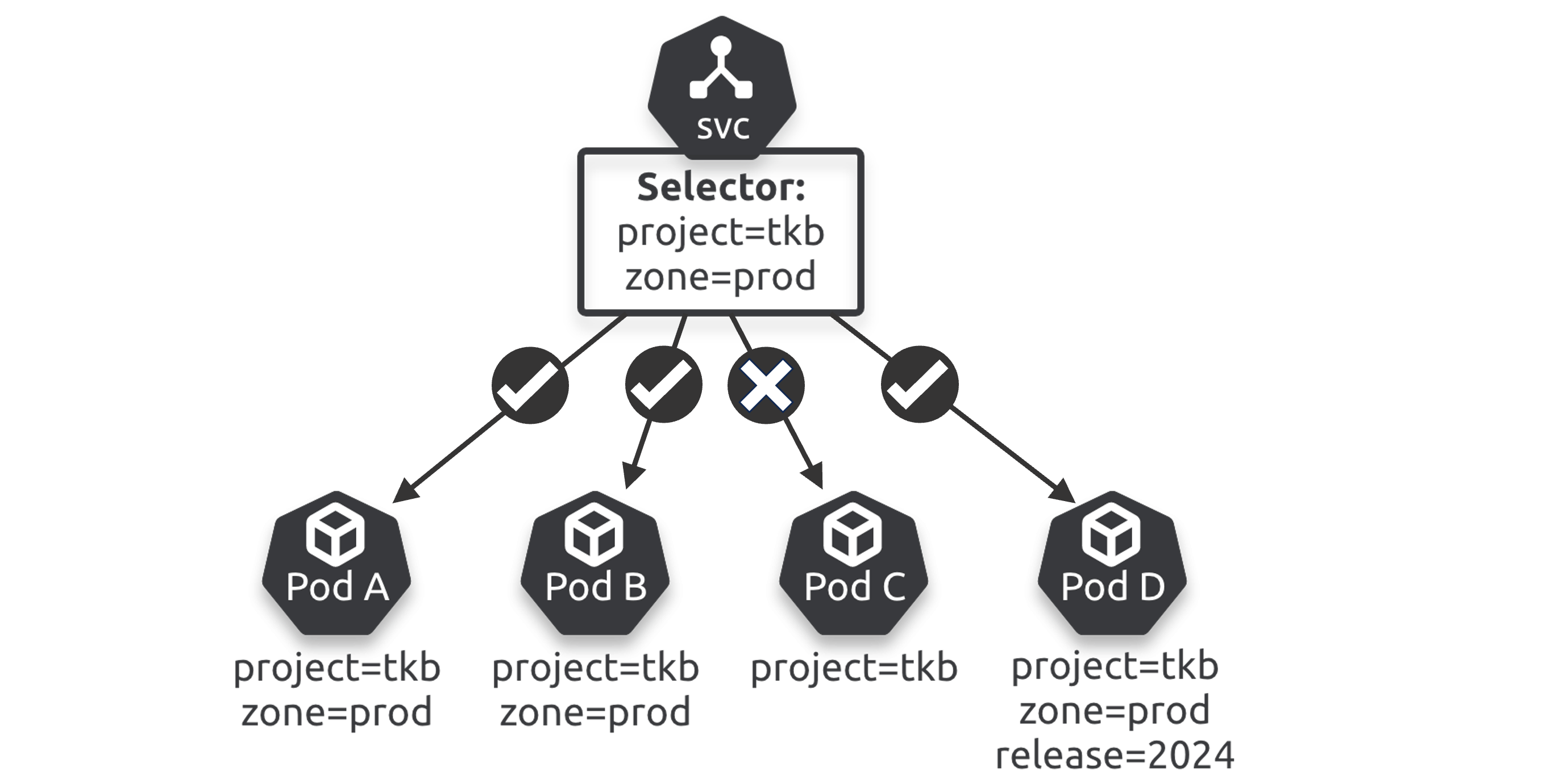
Commands
kubectl expose deployment svc-test --type=LoadBalancerIngress
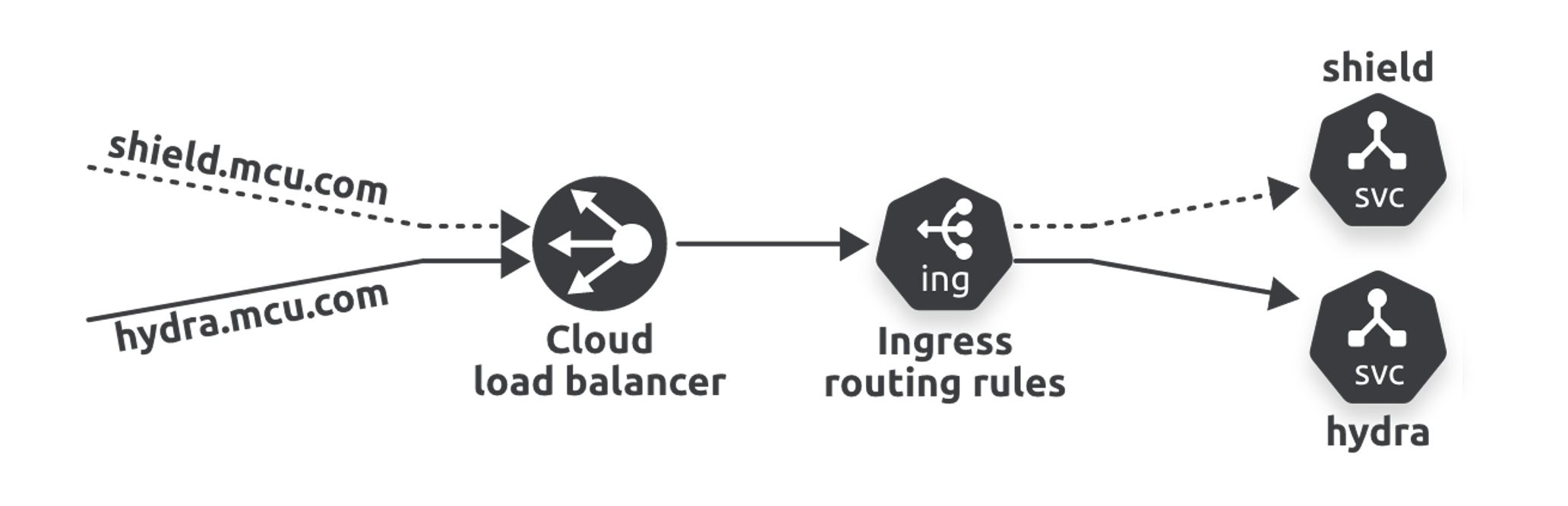
- Load balancers read traffic at L4 (ports)
- Ingress reads traffic at L7 (HTTP/Application)
Storage
CSI - driver/plugin for the storage backend (AWS, local disk, etc.)
StorageClass (SC) - template for storage configuration
PersistentVolumeClaim (PVC) - request for storage from an SC
PersistentVolume (PV) - the actual storage created to fulfill the PVC
PVC requests → SC provisions → PV is created → Pod mounts it
Commands
kubectl get pv
kubectl get pvc
kubectl get sc
ConfigMaps
Three ways to inject ConfigMap data into containers:
- Environment variables - only injected at container creation
- Startup command arguments - only injected at container creation
- Volume files - automatically pushes updates to live containers
spec:
  containers:
    - name: args1
      image: busybox
      command: [ "/bin/sh", "-c", "echo First name $(FIRSTNAME) last name $(LASTNAME)", "wait" ]
      env:
        - name: FIRSTNAME
          valueFrom:
            configMapKeyRef:
              name: multimap
              key: firstname
        - name: LASTNAME
          valueFrom:
            configMapKeyRef:
              name: multimap
              key: lastname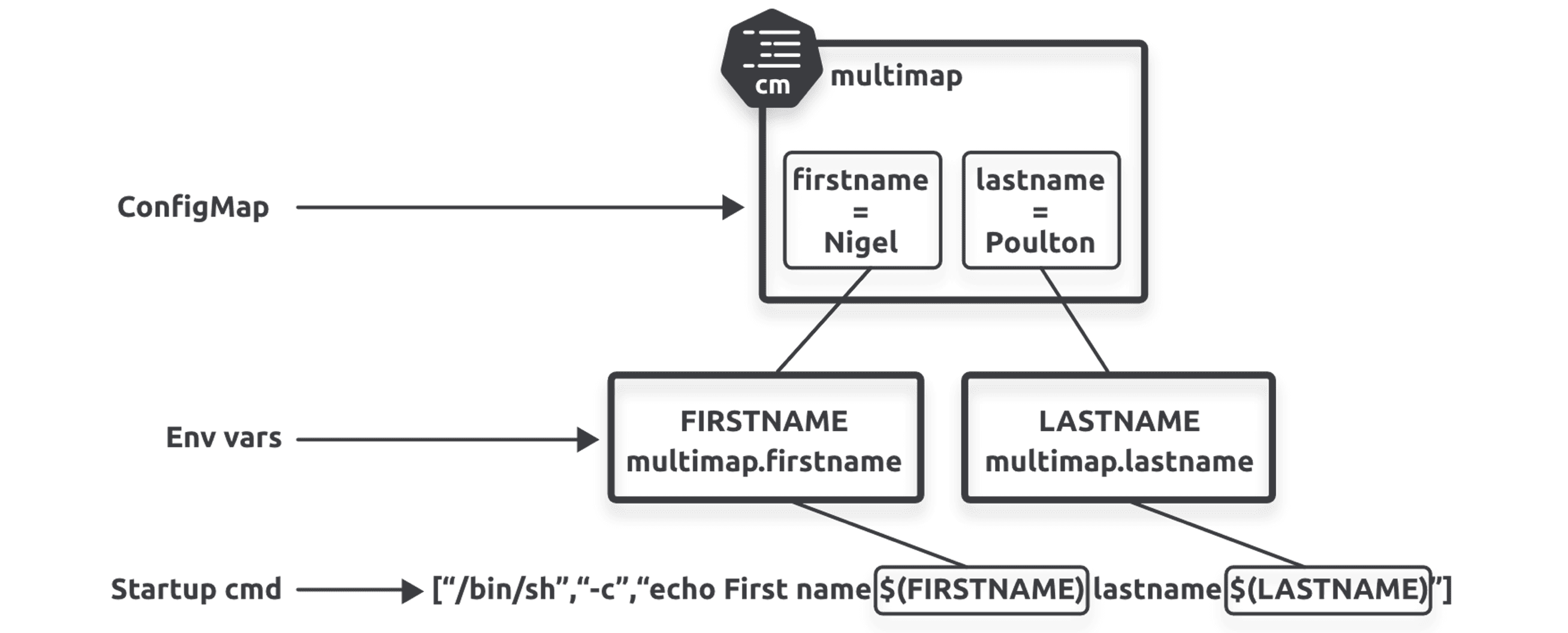
With Volumes
Volumes allow live config updates without restarting the container.
apiVersion: vcallout-Note1
kind: Pod
metadata:
  name: cmvol
spec:
  volumes:
    - name: volmap
      configMap:
        name: multimap
  containers:
    - name: ctr
      image: nginx
      volumeMounts:
        - name: volmap
          mountPath: /etc/name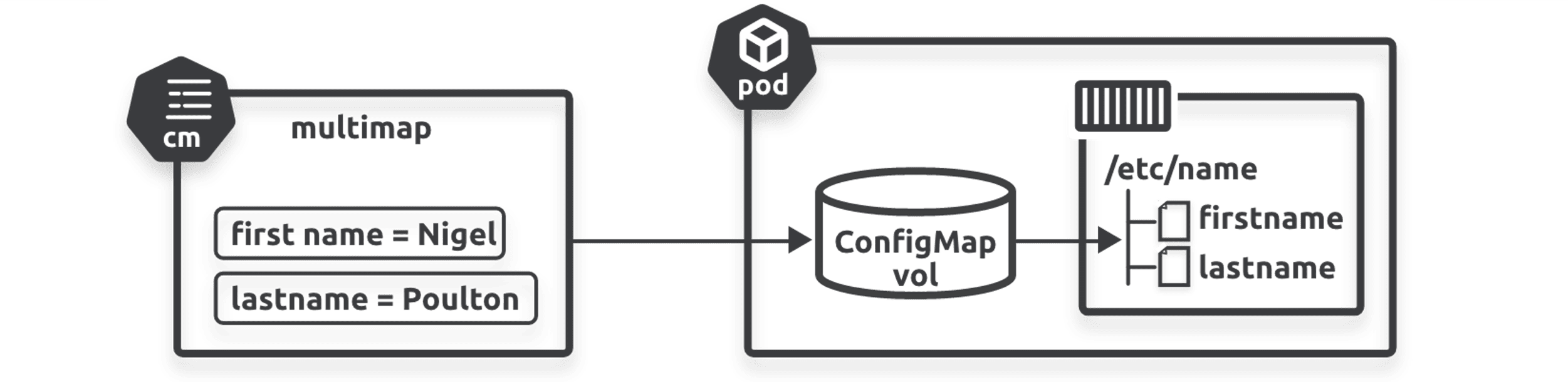
Commands
kubectl get cm

kubectl create configmap testmap1 \\
  --from-literal shortname=SAFC \\
  --from-literal longname="Sunderland Association Football Club"

kubectl create cm testmap2 --from-file cmfile.txt
StatefulSets
Deployments are for stateless apps - Pods are interchangeable with no stable identity or storage.
StatefulSets are for stateful apps, providing:
- Stable Pod names and hostnames
- One-to-one persistent volume mapping
- Ordered deployment and scaling
kubectl scale sts tkb-sts --replicas=0
kubectl delete sts tkb-sts
Headless Services
A headless Service has no ClusterIP - used to access Pods directly by DNS name, typically with StatefulSets.
apiVersion: v1
kind: Service
metadata:
  name: dullahan
  labels:
    app: web
spec:
  ports:
  - port: 80
    name: web
  clusterIP: None
  selector:
    app: web
Kubernetes API
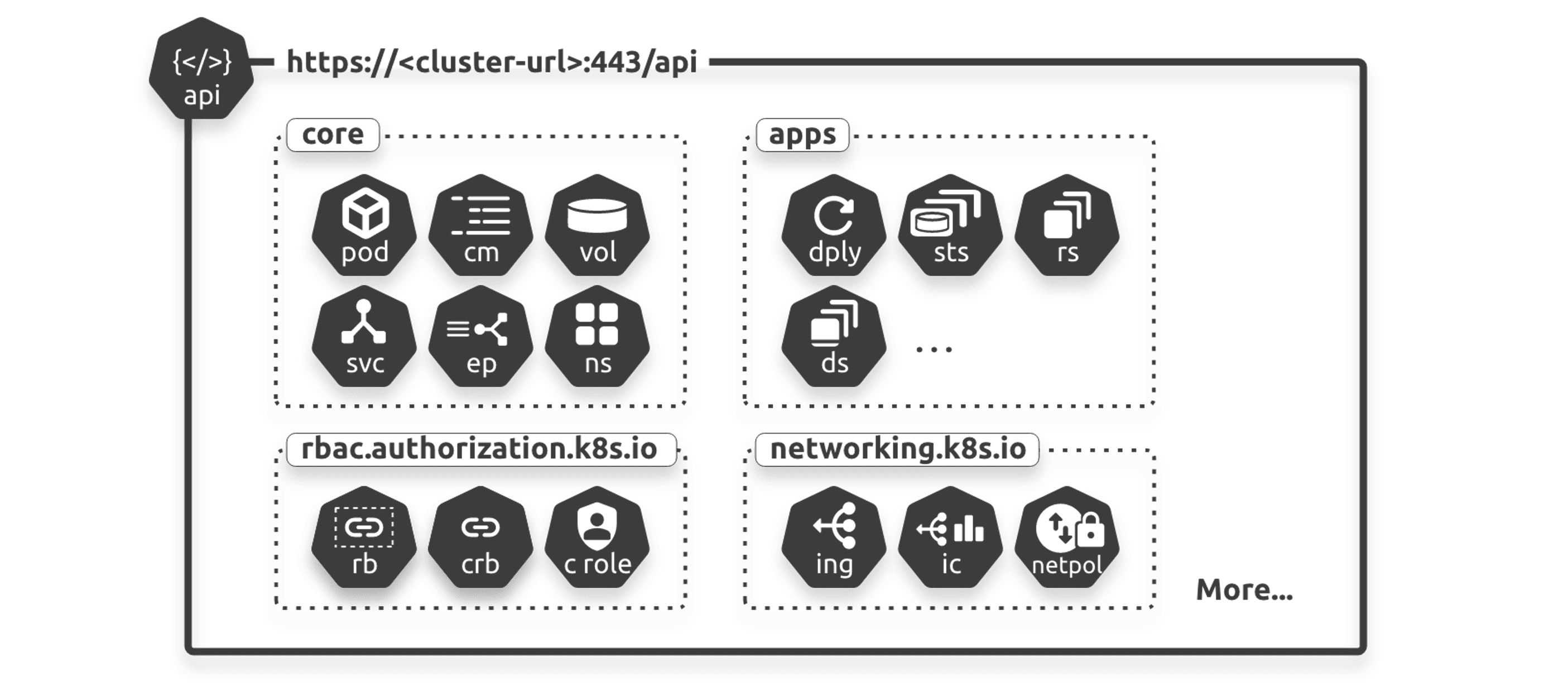
Two API groups: Core and Named
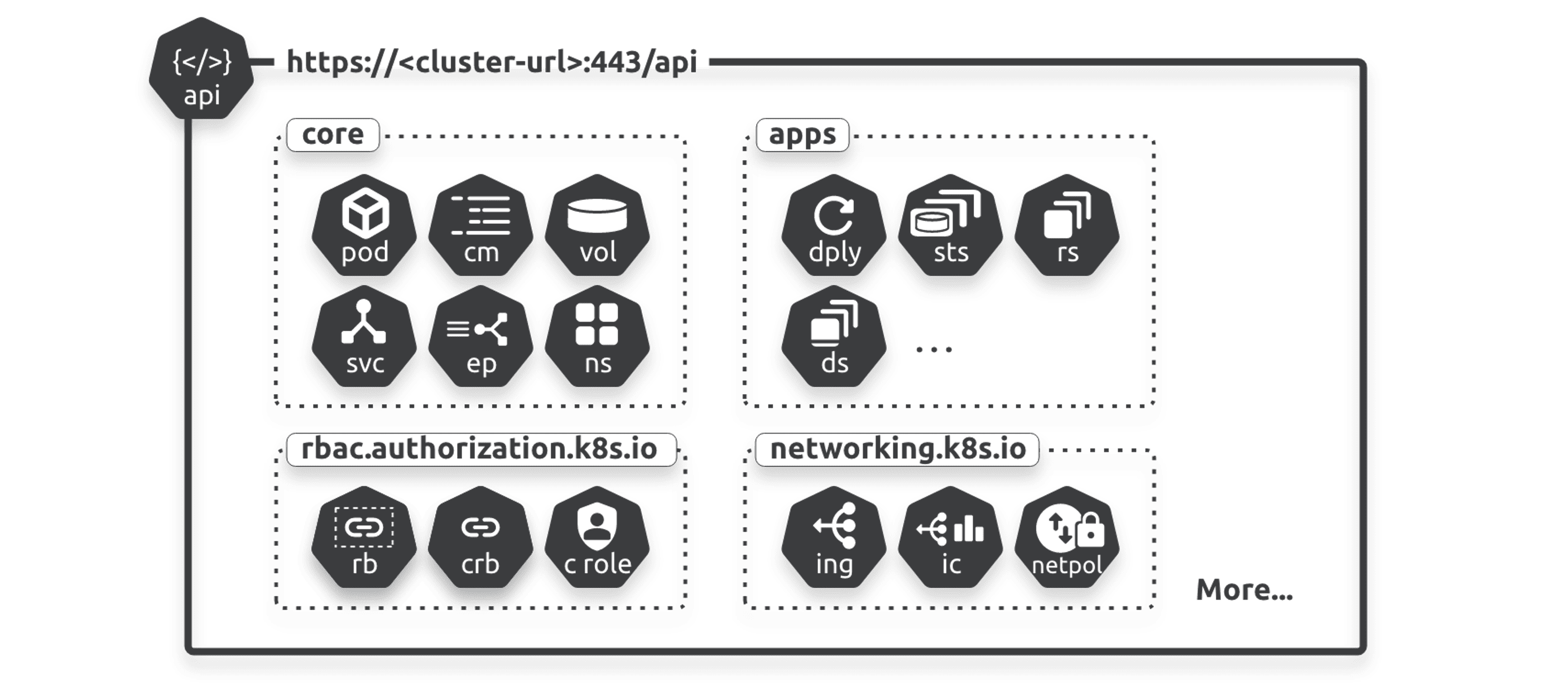
Core - original objects (Pods, Nodes, Services, Secrets) at api/*
Named - later additions at /apis/{group-name}/{version}/
Commands
kubectl api-resources   # all resources, short names and kinds
kubectl api-versions
kubectl cluster-info
kubectl get pods --watch
“You write the app, containerize it and define it as a Pod. However, before sending the Pod to Kubernetes, you wrap it in a Deployment so it gets the resiliency, scaling and update capabilities.”