Devices
Last edited
/dev
The traditional Unix /dev directory is a convenient way for user processes to reference and interface with devices supported by the kernel.
Problem
Two problems with
/dev/:
- The name of the device in
/devtells you a little about the device, but usually not enough to be helpful- the kernel assigns devices in the order in which they are found, so a device may have a different name between reboots.
Solution
sysfsinterface, which is just another file system to interface with devices, but much more structured and verbose.
sysfs interface
The base path for devices is /sys/devices
# A sata
/sys/devices/pci0000:00/0000:00:17.0/ata3/host0/target0:0:0/0:0:0:0/block/sda
Important
Clearly
sysfsis much more verbose, so when should you you use each?
/devfile enables user processes to use the device/sys/devicesis used to view information and manage the device
sysfs is meant to be queried by programs, so the format is structured but human-readable
# Contents of a device path
# /sys/devices/pci0000:00/0000:00:17.0/ata3/host0/target0:0:0/0:0:0:0/block/sda
alignment_offset  discard_alignment  holders   removable  size       uevent
bdi               events             inflight  ro         slaves
capability        events_async       power     sda1       stat
dev               events_poll_msecs  queue     sda2       subsystem
device            ext_range          range     sda5       trace
Use udevadm when querying for device info, it parses sysfs.
udevadm info /dev/sda              # via dev
udevadm info /sys/devices/pci0.... # via sysfs
Device name summary
It can be hard to find the name of a device, here’s a few ways to find it:
- Query
udevdusingudevadm(best if available) - Guess the name from
journalctl -k(kernel logs) - already mounted disks, use
mount
udev
udev (userspace dev) is the daemon that manages device files from userspace, getting it’s intel from kernel messages.
Operation
udevd daemon operates as follows:
- The kernel sends udevd a notification event, called a uevent, through an internal network link.
- udevd loads all of the attributes in the uevent.
- udevd parses its rules, filters and updates the uevent based on those rules, and takes actions or sets more attributes accordingly.
Rules are stored in:
/lib/udev/rules.d # defaults
/etc/udev/rules.d # overrides

# Debian
/usr/lib/udev/rules.d # defualts
udevadm
udevadm is an admin tool for udev. you can reload rules, trigger events, search and explore system devices and monitor uevents as udev gets them from the kernel
Commmands
udevadm monitor you’ll get two copies of each message because by default they print incoming msgs (kernel) and processing msgs to udevd
udevadm monitor # monitor uevents
udevadm monitor --kernel # kernel uevents only
udevadm info --query=all --name=/dev/sda
# Response
P: /devices/pci0000:00/0000:00:06.0/0000:04:00.0/nvme/nvme0/nvme0n1
J: b259:0
D: b 259:0
# ....
# The prefixes (P:) are just shorthands for the field name for parsers, they're just super terse.SCSI
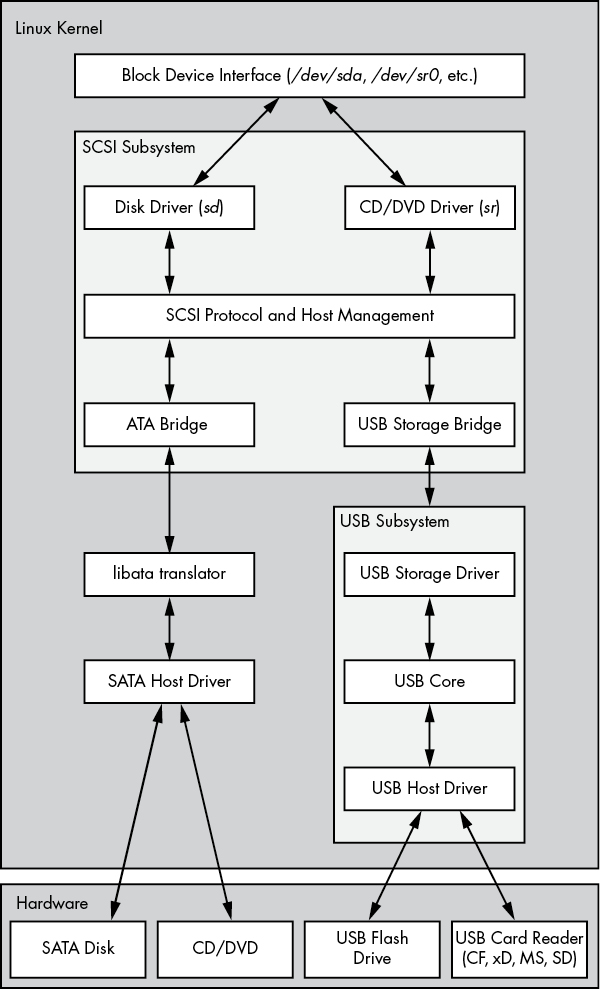
SCSI is a family of standards, layered like TCP/IP, for talking to storage devices. The OS only has to speak SCSI commands to talk to a range of storage devices.
USB, SAS, etcThe transport layer below encapsulates those commands and carries them over whatever hardware is underneath, USB, SAS, etc.SATAis the odd one: it isn’t SCSI, so Linux’slibatatranslates, which is why a SATA disk still appears as sda.
- Top layer
sddriver, translates reuqests from kernel block device interface into commands in the SCSI protocol (and vice versa). - Middle routes SCSI between bottom and top and tracks buses and devices attached
- Bottom layer is hardware specific actions.
This layering is what allows the SCSI interface to work for all devices.
Question
Why does NVMe exist then? SCSI sounds like a simple way to talk to all storage?
Answer
- SCSI was designed for disks initially, so it’s setup to handle one request at at time - this was fine when it took 10ms to seek.
- Flash answers in ~100µs and can handle thousands of requests in parallel. So the bottleneck shifts to the kernel not the device. NVME drops SCSI commands.