Containers
Pithy
What’s the core use/benefit of containers?
A container image simplifies matters by packaging an application and its prerequisites into a standard, portable file. Any host with a compatible container run-time engine can create a container by using the image as a template.
Core concepts
What really is a container?
A Container is an isolated group of processes that are restricted to a private root filesystem and process namespace. The contained processes share the kernel and other services of the host OS, but by default they cannot access files or system resources outside their container.
Kernel support
Containers contain no magic. In fact, they rely on some features of UNIX and Linux that have been around for many years.
Some of the features that enable isolation of processes for containers:
Namespacesisolate containerized processes from the perspective of several operating system facilities, including filesystem mounts, process management, and networkingControl groups(cgroups) limit the use of system resources (cpu+memory)Capabilitiesallow processes to execute certain sensitive kernel operations and system callsSecure computing mode(shortened to seccomp) restricts access to system calls. It allows more fine-grained control than do capabilities
Development of these features was driven in part by the Linux Containers project, LXC, which began at Google in 2006. LXC supplies the raw functions and tools needed to create and run Linux containers, but with more than 30 command-line tools and configuration files, it’s quite complicated. The first few releases of Docker were essentially user-friendly wrappers that made LXC easier to use.
Docker now relies on an improved, standards-based container run time named containerd (really just the daemon that manages images and container state, then hands off to runc to do the real work). Under the hood it uses all the kernel support mentioned.
runc
runtime: the thing that’s running when your code/process is alive. Think python is the runtime for python code. runc is only the runtime for creating the container, after that it hands off the process.
Pithy
Runc does one job: take the spec (
config.json), make the kernel calls to build the isolated environment, then exec the process into it. After that, runc’s work is done and it’s just your process running in a box the kernel is maintaining.
config.json is a declarative spec that runc translates into both host kernel operations and in-container configuration. Together they create the process and the runtime environment in the container.
The configuration consists of the common and platform-specific sections
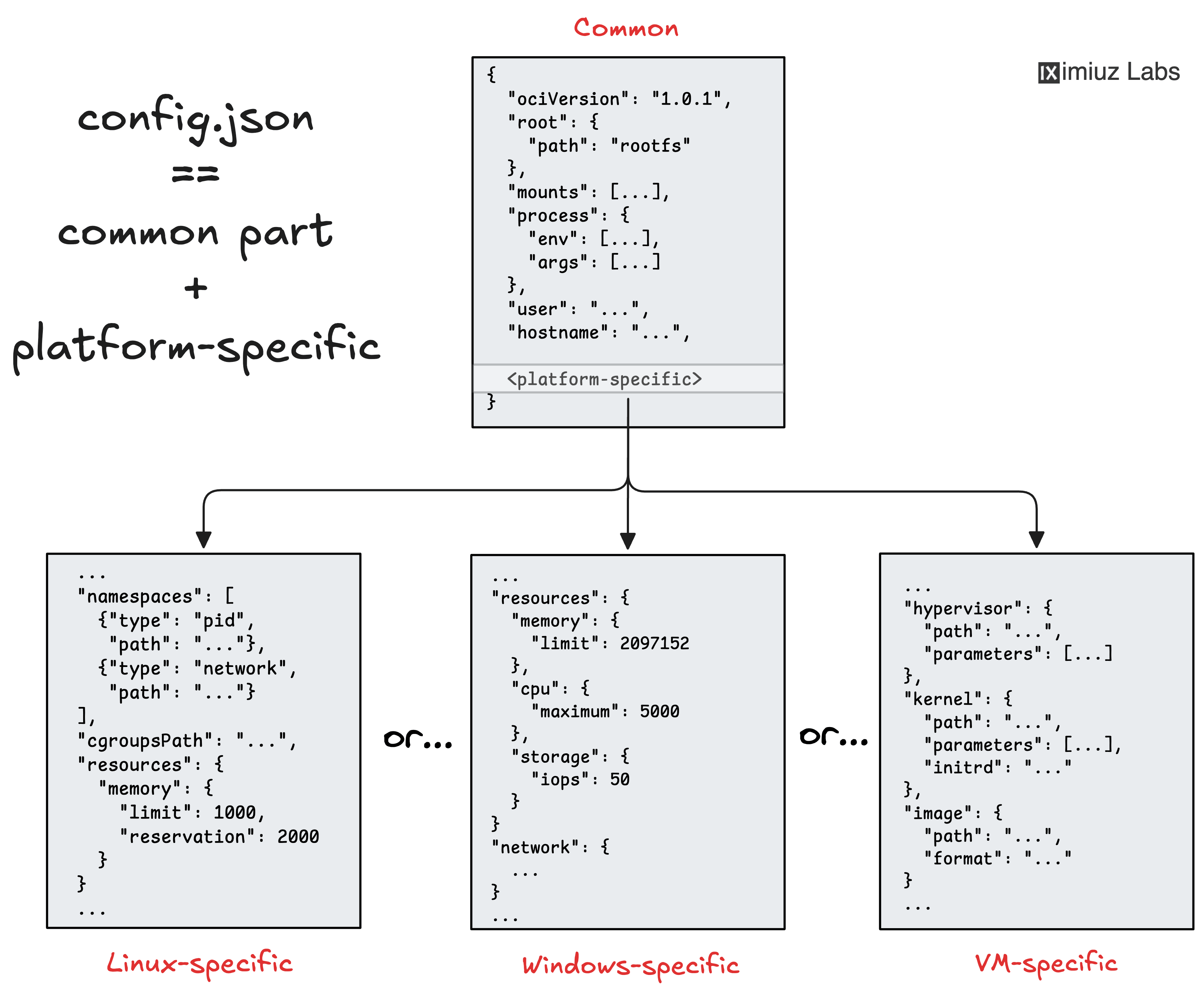
Definition
Bundle: A file system directory with at least one executable inside and a
config.json
Example using runc with a bundle.
runc spec             # generate a base spec
mkdir rootfs          # this is used in the run spec
                      # (default only can be whatever you define) as the default filesystem to mount
touch rootfs/mybinary # add your executable to the fs so
sudo runc run mycont1 # run the container based on the config.json
Question
Well this seems simple enough, why don’t we keep layering bundles (file systems) on top of each other and then run then let runc build the container? Why bother with layers?
Answer
Without layers, creating a second bundle derived from
ubuntumeans copying all its files into a new folder. A third bundle means copying again. These would overlap in the final container, but on your local build machine you’re storing duplicate copies of the entire parent filesystem. Layers do this by packing theubuntubund in a tar archive and computing its checksumsha256, that way we can refer to it. The layered image structure solves the problem of the efficient building (by eradicating the undamentals of Software need for copying files, hence decreasing the build time) and storage (by eradicating file duplication, hence decreasing the space requirements)
Images
A container image is basically a template for a container. Images rely on union filesystem mounts for performance and portability. Unions overlay multiple filesystems to create a single, consistent hierarchy.
To create a container, Docker points to the read-only union filesystem of an image and adds a read/write layer that the container can update. When containerized processes modify the filesystem, their changes are transparently saved within the read/write layer. The base remains unmodified. This is known as a copy-on-write strategy.
Am image includes the files that processes running within the container instance depend on such as:
- libraries
- operating system binaries
- applications
Linux distributions can function as convenient base images because they define a complete operating environment. However, an image is not necessarily based on a Linux distribution. The “scratch” image is an explicitly empty image intended as a basis for creation of other, more practical images.
Definition
Images are archives (
.tar) with a filesystem inside, they may also contain configuration data like default commands, ports, etc.
When we start a container from an image, the image gets unpacked and its content are provided to the container runtime in a form of a filesystem bundle (a regular directory containing the future root filesystem files and some configs).
If you don’t have the image but you do need the alpine Linux distro as the execution environment, you always can grab Alpine’s rootfs (2.6 MB) and put it to a regular folder on your disk, then mix in your application files, feed it to the container runtime and call it a day.
FROM scratch
ADD alpine-minirootfs-3.11.6-x86_64.tar.gz /
CMD ["/bin/sh"]
# We've made the alpine image
However, to unleash the full power of containers, we need handy image building facilities. Historically, Dockerfiles have been serving this purpose.
Any Dockerfile must have the FROM instruction at the very beginning. This instruction specifies the base image while the rest of the Dockerfile describes the difference between the base and the derived (i.e. current) images.
More often than not, we need to utilize distro’s facilities to prepare the file system of the future container and one of the most common examples is probably when we need to pre-install some external packages using yum, apt, or apk:
FROM debian:latest
RUN apt-get install -y ca-certificates
How does this work if our host distribution is Fedora? We don’t have the apt binary?
Every time, Docker (or buildah, or podman, etc) encounters a RUN instruction in the Dockerfile it actually fires a new container:
- Spins up a temporary container from
debian:latestimage (includesaptbinary at /usr/bin/apt-get, package metadata in /var/lib/apt/lists/) - Executes
apt-get install -y ca-certificatesinside that container (not on host) - Commits any filesystem changes as a new layer (which is why cleanup steps often remove logs/cache to keep layers small)
- destroys the temporary containers
Blobs blobs = generic filesystem chunks referenced by hash instead of human names. The reason they change them to blobs is typically if they’re used in multiple images and would rather remove the naming and rely on hash instead.
Networking
The default way to connect containers to the network is to use a network namespace and a bridge within the host, in this configuration:
- Containers have private IP addresses that aren’t reachable from outside the host
- The host acts as a poor man’s IP router and proxies traffic between the outside world and the containers
- This architecture gives administrators control over which container ports are exposed to the outside world
It’s also possible to forgo the private container addressing scheme and expose entire containers directly to the network. This is called host mode networking, and it means that the container has unfettered access to the host’s network stack. This might be desirable in some situations, but it also presents a security risk because the container is not fully isolated.
Docker
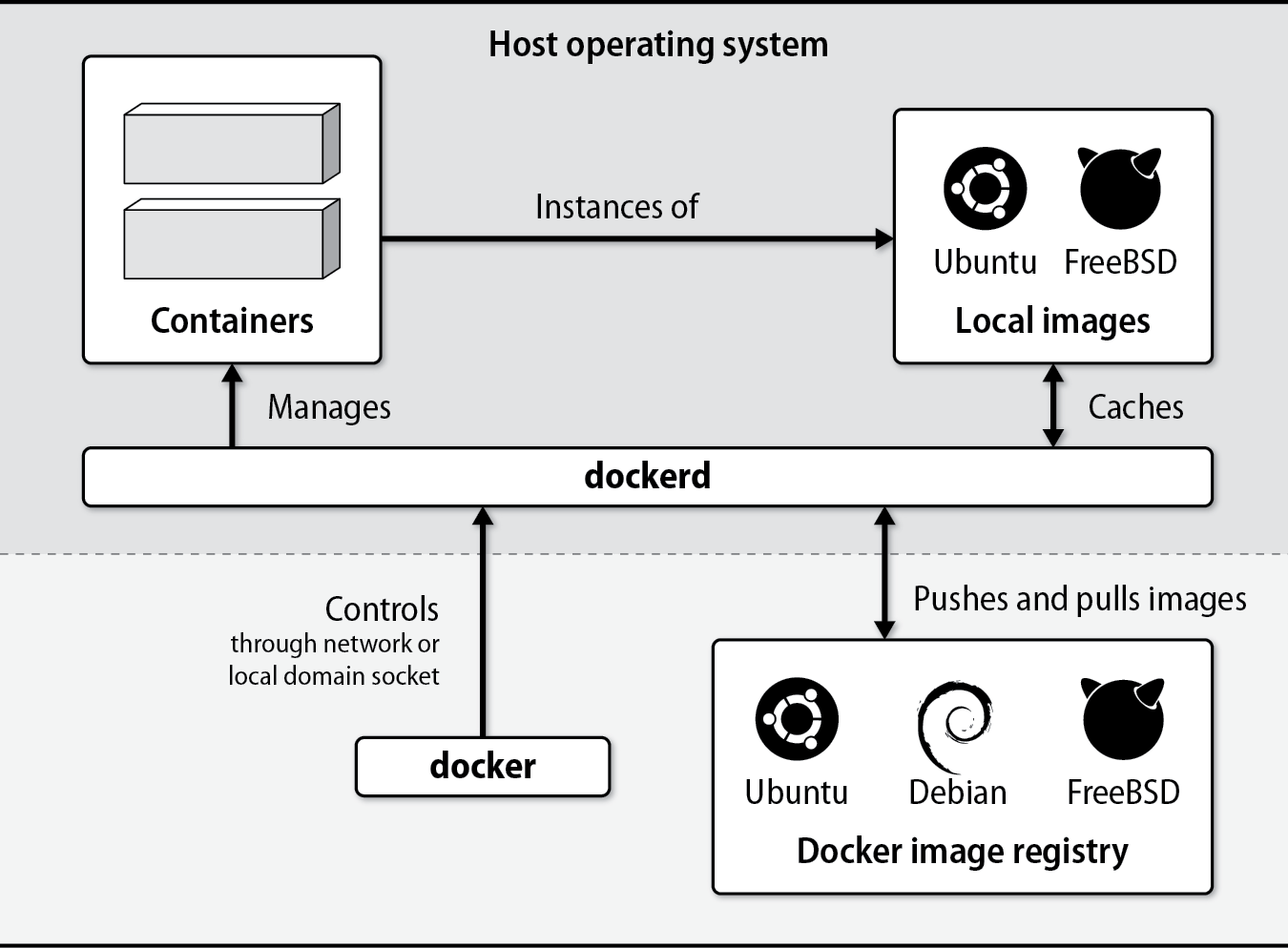
Docker, Inc.’s primary product is a client/server application that builds and manages containers.
Architecture
dockeris an executable command that handles all management tasks for the Docker system. -dockerdis the persistent daemon process that implements container and image operations.dockercan run on the same system asdockerdand can communicate with it through UNIX domain sockets, or it can contactdockerdfrom a remote host over TCP
Commands
docker info       # Displays summary information about the daemon
docker ps         # Displays running containers
docker version    # Displays extensive version info about the server and client
docker rm         # Removes a container
docker rmi        # Removes an image
docker images     # Displays local images
docker inspect    # Displays the configuration of a container (JSON output)
docker logs       # Displays the standard output from a container
docker exec       # Executes a command in an existing container
docker run        # Runs a new container
docker pull/push  # Downloads images from or uploads images to a remote registry
docker start/stop # Starts or stops an existing container
docker top        # Displays containerized process status
Install
Users in the docker group can control the Docker daemon through its socket, which effectively gives those users root privileges. This is a significant security risk, so we suggest that you use sudo to control access to docker rather than adding users to the docker group. In the examples below, we run docker commands as the root user.
TODO: FINISH Docker
Containers in Practice
Best practices
- When your application needs to run a scheduled job, don’t run cron in a container. Use the cron daemon from the host (or a systemd timer) to schedule a short-lived container that runs the job and exits.
- Don’t ssh to instances (ideally you shouldn’t have sshd running anyways in the container), access the host and
docker execin - Ignore the advice “one process per container”. Split processes into separate containers only when it makes sense to do so. For example, it’s usually a good idea to run an application and its database server in separate containers because they are separated by clear architectural boundaries. It’s perfectly OK to have more than one process in a container when that’s appropriate.
Logging
Containers do not run syslog. Instead, Docker collects the logs for you through logging drivers. Container processes need only write logs to STDOUT and errors to STDERR.
Important
If your software supports logging only to files create symbolic links from log files to
/dev/stdoutand/dev/stderrwhen you build the image.
Docker forwards the log entries it receives to a selectable logging driver:
| Driver | What it does |
|---|---|
json-file | Writes JSON logs in the daemon’s data directory (default) ᵃ |
syslog | Writes logs to a configurable syslog destination ᵇ |
journald | Writes logs to the systemd journal ᵃ |
gelf | Writes logs in the Graylog Extended Log Format |
awslogs | Writes logs to the AWS CloudWatch service |
gcplogs | Writes logs to Google Cloud Logging |
none | Does not collect logs |
ᵃ Log entries stored this way are accessible through the docker logs command.
ᵇ Supports UDP, TCP, and TCP+TLS.
Security
- Container security relies on processes within containers being unable to access files, processes and other resources outside their sandbox.
- Vulnerabilities that allow attackers to escape containers—known as breakout attacks—are serious but rare.
- The code that underlies container isolation has been in the Linux kernel since at least 2008; it’s mature and stable.
- As with bare-metal or virtualized systems, insecure configurations are a far more likely source of compromises than are vulnerabilities in the isolation layer
Restrict access to the daemon
Above all, protect the docker daemon. Because dockerd necessarily runs with elevated privileges, it’s trivial for any user with access to the daemon to gain full root access to the host.
docker run --rm -v /:/host -t -i debian bash
root@945214b2e07e:/# wc /etc/shadow
 18  18 474 /etc/shadow
# Easy root access!
Run processes in containers as unpriviledged users
Processes in containers should run as nonroot users, just as they should on a full-fledged operating system. This practice limits an attacker’s ability to launch breakout attacks. When you are writing a Dockerfile, use the USER instruction to run future commands in the image under the named user account.
What’s going on here? This whole user thing is confusing, since the docker container itself runs as whoever calls it?
Let’s start off with understanding the default state.
docker run --rm python:slim whoami
root
That’s default, every RUN and CMD (COPY is separate: it always writes as 0:0 regardless of USER, use --chown) instruction runs as root unless you say otherwise.
If an attacker finds a vulnerability in your app, they can inherit those root privileges inside the container.
This is the same problem as normal vms and bare metal os’, it’s better to create a user with only access to what it needs to so in the worst case if the attack has a way to execute commands they can only touch binaries and files that you explicity let the user own/read/execute. Although this is inside the container, so your host OS is still secure likely secure, it’s still an easy thing to do and should always be done if possible.
Great so now we know why we want the container user to be created how do we?
FROM python:slim
RUN apt-get update && \
    apt-get install -y procps
ARG UID=1666
RUN useradd \
    --create-home \
    --home-dir /app \
    --uid $UID \
    --shell /usr/sbin/nologin \
    app
USER app
CMD ["sleep", "3600"]
So the process running my server process “sleep” (imagine its a web server or your app). So who is really running the process?
# Host OS
ps -o uid,user,cmd -u 1666
    UID  USER     CMD
    1666 1666     sleep 3600
# User is not able to map because when it looks up 1666 in my real
# /etc/passwd there is no username, which is expected

# Inside container
userTest docker exec test ps -o uid,user,cmd | grep -v ps
    UID  USER     CMD
    1666 app      sleep 3600
Okay.. so this is pretty comforting. How does this work, how am I running a process on my host OS without a real user existing?
Yes, this is very possible. The host OS doesn’t need a real uid or gid to create a process, it just takes integers.
The only thing we can lose with this approach is some made up user won’t have access to any files, folders or programs of their own they’ll fall under the “others” permissions in unix. That’s why we opt to make a user and chown what they actually need.
clone()            // new process, still uid 0
setgid(1666)       // update the process to have a uid 1666
setuid(1666)       // udpate the proecss to have a gid 1666
execve("/bin/sleep", ["sleep","3600"], envp)
So final important bit, lets say I made a user in my container UID 1000 and the user broke out of the container. They would be user 1000 on the host OS. They could access whatever user 1000 can access. Use 65532. Here’s the rules why:
- Never root
0 - Not
1000, collides with first human user - Not
65534(nobody, shared bucket) and nothing above 65535. - Keep UID as an ARG so
--build-arg UID=1000at runtime is available when someone needs it.
Container Clustering and Management
Docker engine is responsible only for individual containers, not for answering the broader question of how to run many containers on distributed hosts in a highly available configuration. That’s the role of Kubernetes.
Resources
https://iximiuz.com/en/posts/not-every-container-has-an-operating-system-inside/ https://docs.inedo.com/docs/proget/docker/fundamentals/terminology