Firewalls and NAT
Question
Can I use UNIX/Linux/Windows as my border firewall?
Answer
Best practice = dedicated appliance.
Acceptable alternative = hardened Linux if you have skill or budget constraints.
Linux is a full-fledged general-purpose OS, it comes with a larger attack surface compared to a single purpose firewall.
Microsoft convinced the world that every computer needs a built-in firewall, but that’s marketing, it’s not actually required.
Machine-specific firewalls are optional, but if you implement them, they must be managed systematically via configuration management tools; otherwise, inconsistent manual configs will cause more problems than they solve.
iptables / netfilter
netfilter Kernel framework for packet/frame manipulation via hooks into the network stack.
Everything in netfilter happens on the kernel side (without user space code involved).
Netfilter’s code resides inside of the Linux kernel and adds hooks to different stages of the network stack (CHAIN).
Note
Docker uses netfilter extensively for isolation, to saftely open ports and route traffic
This walk through explains netfilter better than I ever could: https://iximiuz.com/en/posts/laymans-iptables-101/
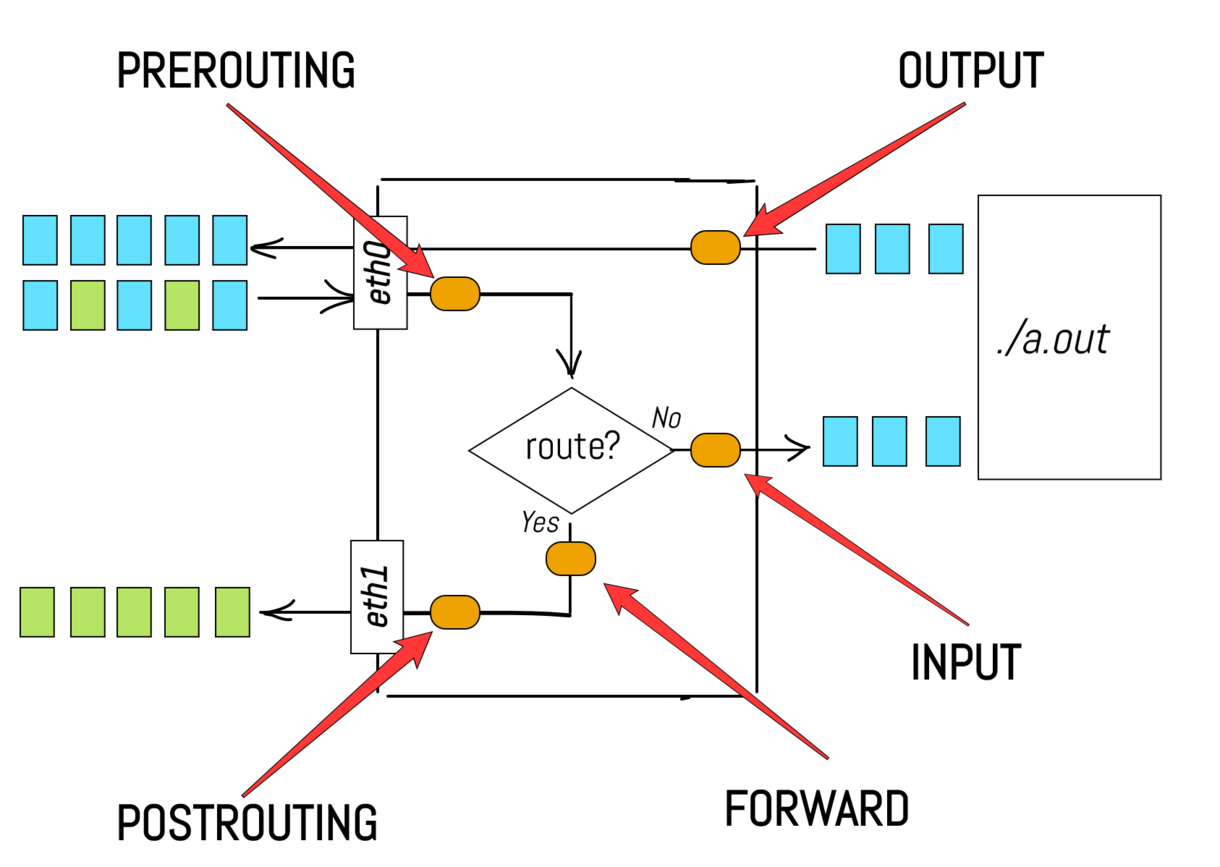
Config Parameters
These are the core components to build iptable rules
| Component | Values | Description |
|---|---|---|
| TABLE | filter, nat, mangle | What kind f operation you’re preforming on it, will you filter it, will you nat it? |
| CHAIN | INPUT, OUTPUT, FORWARD, PREROUTING, POSTROUTING | What stage in the network stack to listen in on |
| MATCH | -s/-d (IP), -p (protocol), –dport/–sport (port), -i/-o (interface), -m (extension) | Specific targeting |
| TARGET | ACCEPT, DROP, REJECT, LOG, REDIRECT, RETURN | What you will do to the packet |
CHAIN
Question
Why are they called chains, when they look like stages?
Answer
When a new packet arrives the first added callback is executed first (LOG the packet), then the second callback is executed (DROP the packet).
Thus, all our callbacks have been lined up in a chain.# Log then drop the packet iptables --append INPUT --jump LOG iptables --append INPUT --jump DROP
RULES
The above example we had two rules
# Unconditionally LOG a kernel message for every packet in the INPUT chain
iptables --append INPUT --jump LOG
# Unconditionally  DROP every packet from the network stack
iptables --append INPUT --jump DROP
The idea is pretty simple.
Sequentially apply all the rules in the chain until either a terminating target is encountered, or the end of the chain is reached
This does require a “defualt action” (TARGET) for packets that manage to reach the end of the chain without being sent to any terminating target. To set this use a policy.
# set a default policy for packets that reach the end of the chain
iptables --policy FORWARD DROP

# This is what it looks like when all policies are set to allow
iptables --list-rules
-P INPUT ACCEPT
-P FORWARD ACCEPT
-P OUTPUT ACCEPT
TARGETS
Question
Why are TARGETS called TARGETS not ACTIONS. It seems like the wrong abstraction?
Answer
They’re called TARGETS because -j means –jump target, you jump to them, not just perform them. This is where the ACTIONS abstraction breaks.
TARGET= a destination subroutine you jump toUser-defined chain = subroutine with custom rules inside
Built-in targets (DROP, ACCEPT, etc.) = pre-written subroutines with hardcoded behavior
TABLES
Table is a logical grouping and isolation of chains. Process through these chains in this order, separated by purpose.
You could dump all rules in one chain and order them manually
TODO: ADD A LIST OF TABLE TYPES, WITH ORDER!!
iptables -A INPUT -p tcp --dport 8080 -j REWRITE_TO_80    # rewrite
iptables -A INPUT -p tcp --dport 80 -j ACCEPT              # allow
iptables -A INPUT -p tcp --dport 443 -j ACCEPT             # allow
iptables -A INPUT -p tcp -j SET_TTL_VALUE                  # modify
But instead, tables enforce a logical grouping with named predefined order, to what makes sense by default
# NAT table — all rewrites happen here first
iptables -t nat -A PREROUTING -p tcp --dport 8080 -j REDIRECT --to-port 80
# Filter table — all allow/block happens here second
iptables -t filter -A INPUT -p tcp --dport 80 -j ACCEPT
# Mangle table — all modifications happen here (in kernel order)
iptables -t mangle -A INPUT -p tcp -j SET_TTL_VALUE
Examples
TODO: UPDATE
iptables -A INPUT -s 192.168.1.100 -p tcp --dport 22 -j ACCEPT

# Breakdown
-A INPUT         # append to INPUT chain                           (CHAIN)
-s 192.168.2.100 # source up                                       (MATCH)
--dport 22       # destination port                                (MATCH)
-j ACCEPT        # using the builtin routie to accept              (TARGET)
                 # if no TABLE is provided it assumed to be filter (TABLE)
Commands
# Informational
iptables -L # list all rules (readable format)
iptables -L INPUT # print all in a specific chain
iptables -L -v -n # verbose + numeric IPs
iptables -L --line-numbers # with rule numbers (for deletion)
iptables --list-rules # dump all rules (raw format)
https://www.digitalocean.com/community/tutorials/how-to-list-and-delete-iptables-firewall-rules
Config
A Linux firewall is usually implemented as a series of iptables commands contained in an rc startup script.
Full Example
TODO: DO A REAL EXAMPLE
iptables -F              # flush all tables for a clean slate
iptables -P INPUT DROP   # deny all
iptables -P FORWARD DROP # deny all

iptables -A FORWARD -j ACCEPT # allow all

# Allow loopback (for localhost)
iptables -A INPUT -i lo -j ACCEPT
One of the best ways to debug your iptables is use
# Tells you how many times each rule in your chains matched a packet
iptables -L -v
# Adding a LOG target as well works
iptables --append INPUT --jump LOG
Linux NAT
It should be stated that Linux’s Network Address Translation is only limited, it’s really PAT (Port Adress Translation). Where NAT uses a range of IPs, PAT uses a range of ports to multiplex all connections onto a single address.