SSH
Developed in 1999 by OpenBSD. It’s a software suite with serveral commands:
ssh # client
sshd # server daemon

ssh-keygen # generate public/private key pairs
ssh-add    # managing authentication keys
ssh-agent # daemon that holds keysssh/sshd
Public key authentication is the recommended authentication method.
Config
Files
# Client and server 0755
ssh_config          0644  # site-wide client config
sshd_config         0644  # server config
moduli              0644  # DH key-exchange primes/generators
ssh_import_id       0644  # pull public key from external backend like github
*_key               0600  # host private keys (one per algorithm)
*_key.pub           0644  # matching host public keys
~/.ssh/
# Client        0700
config          0600   # per-user client config (Host blocks, overrides)
id_ed25519      0600   # your private key
id_ed25519.pub  0644   # matching public key
known_hosts     0644   # server host keys you've accepted
known_hosts.old 0644   # backup written by ssh-keygen -R

# Server        0700
authorized_keys 0600   # public keys allowed to log in as this user
ssh client
ssh [options] [username@]host [command]
ssh k3s.lan "df -h"
config is read in the priority order below
- cli-flags
~/.ssh/config/etc/ssh/ssh_config
Config options
Host sc1
    Hostname k3s.lan
    User mat
    Port 22
    ForwardAgent yes
    StrictHostKeyChecking accept-new
    IdentityFile ~/.ssh/id_k3s
    IdentitiesOnly yes                # only send this key rather than trying all default names

Host 192.168.* # globbed
    User mat
You can also send config via the cli with -o (options)
# accept-new = only flag if key changed otherwise don't prompt
ssh -o StrictHostKeyChecking=accept-new server.admin.com
Connection Mulitiplexing
ControlMaster enabled multiplexing, the first connection to a host creates a socket that can be reused.
- Each new host creates its own connection (socket), so this is only useful for multiple connections to a single server.
There are 2 situations you will benefit from using the TCP connections:
- You’re disconnecting and reconnecting requently. Using
ControlPersist Xmif you disconnect for less thanXmyou can connect back quicker and cheaper over that same socket. - If you’re setting up multiple concurrent ssh connections to a single host, similar to how Ansible works where each task will be it’s own ssh connection to the same host. All connections will multiplex over the single socket.
Host *
    ControlMaster auto                    # auto create master conn
    ControlPath ~/.ssh/cm_socket/%r@%h:%p # where to create the socket
    ControlPersist 30m                    # keep socket alive for 30m
Public key authentication
ssh-keygen \
  -t ed25519 \              # key type
  -C "mat@laptop-2026" \    # comment/label baked into the .pub
  -f ~/.ssh/id_k3s \        # output filename, requires you to use IdentityFile explicitly
  -N '' \                   # passphrase inline
ssh -i ~/.ssh/id_ecdsa mat@k3s.lan
ssh-keygen prompts for an optional passphrase to encrypt the private key. If you use a passphrase, you must type it to decrypt the key before ssh can read it.
Do this for accounts that have sudo access.
Port fowarding
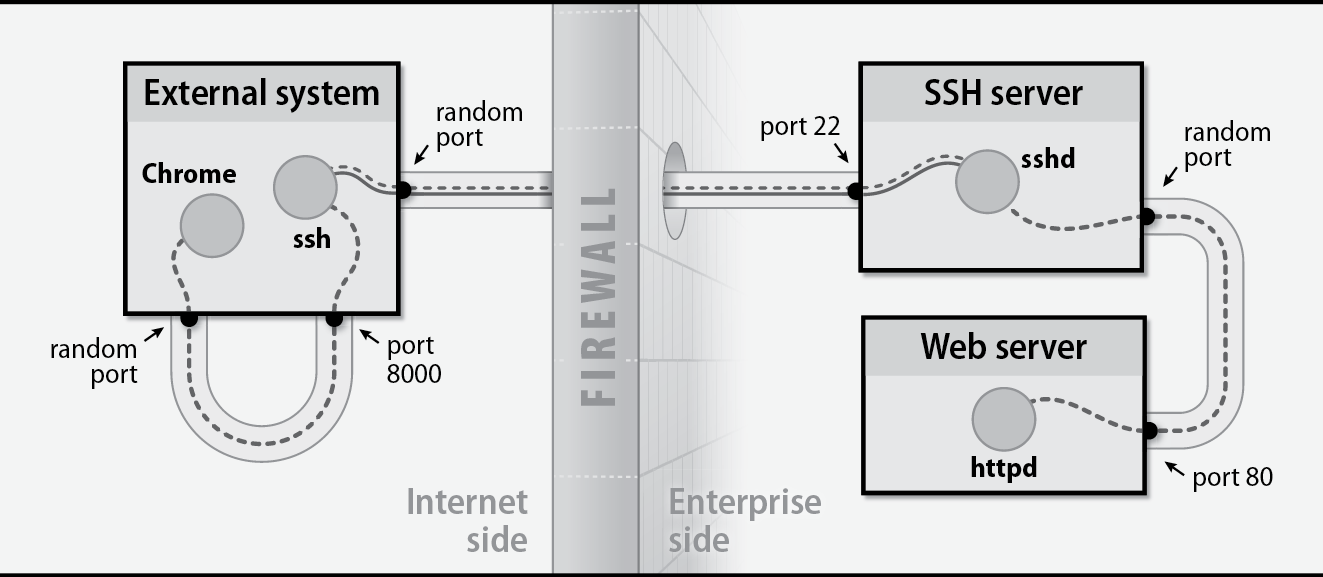
ssh into the remote server
ssh -L 8000:webserver:80 server.admin.comconnect your local machine access 8000 to foward traffic over ssh
ssh-agent / ssh-add
ssh-agentis a daemon that caches decrypted private keys in memory.ssh-addthe client that talks to the agent.
ssh-add ~/.ssh/id_ed25519 # add a key
# Enter pass phrase to decrypt if needed

ssh-add -l # list active keys (hashed)
ssh-add -L # list active keys full pubkey, can be copied into authorized_keys

ssh-add -d ~/.ssh/id_ed25519 # remove a key
ssh-add -D # remove all
sshd
- sshd runs as root
- it forks an unprivileged child process for each connected client with the same permissions as the connecting user
if you make changes to sshd_config send HUP to the parent or reload with sshd for the changes to effect new conneections (existing connections are preserved with previous settings)
sudo kill -HUP $(/var/run/sshd.pid)
systemctl reload ssh