Storage
Hard disks
First, the head armature must swing into position over the appropriate track. This part is called seek delay. Second, the system must wait for the right sector to pass underneath the head as the platter rotates. That part is rotational latency. Disks can stream data at hundreds of MB/s if reads are optimally sequenced, but random reads are unlikely to achieve more than a few MB/s.
Harddrives have a 2 year honeymoon phase where fail is unlikely, then jump to 5%-8% hard disks in the Google study had less than a 75% chance of surviving a five-year tour of duty.
Drive Types
Only three companies still manufacture hard disk drives: Seagate, Western Digital, and Toshiba. Nearly every HDD sold today ultimately comes from one of these three manufacturers.
Brand segment their hard disks into a few catergories:
- Value – cheap, good enough for general storage.
- Performance – mass-market drives for gamers and power users.
- NAS – designed for 24/7 operation, balancing performance, reliability, and low heat.
- Enterprise – high RPM, high endurance, expensive.
The differences among these drive categories are about half real and half marketing. All classes of drives work fine in all applications, but performance and reliability may vary. NAS drives are probably the best all-around choice for drives to keep on hand to fill a variety of potential needs.
Solid state drives
Rewritability Limits
The theoretical limits on the rewritability of flash memory are probably less an issue than they might initially seem.
You would have to stream 100 MB/s of data to a 500GB SSD for more than 15 continuous years to start running up against the rewrite limit.
Tip
It pays to know your workloads. For access patterns that are in fact heavily sequential, hard disks can still be competitive with SSDs, especially when hardware costs are taken into consideration.
Page clusters and pre-erasing (TRIM)
A further complication is that flash memory pages must be erased before they can be rewritten
- erasing is a separate operation that is slower than writing
- write performance of an SSD can drop substantially when the pool of pre-erased pages is exhausted and the drive must recover pages on-the-fly to service ongoing writes.
- filesystems designed for traditional hard disks do not actually erase data blocks they are no longer using
- storage device doesn’t know that the filesystem now considers a given block to be free; it knows only that long ago someone gave it data to store there.
the filesystem must be capable of informing the SSD that certain pages are no longer needed. To handle this we use TRIM (trim is short for trimming).
Pithy
TRIM tells the SSD which blocks the filesystem no longer needs, so they can be erased and reused.
SSD reliability
Unreadable blocks are common and that they typically occur in isolation. The usual scenario is for an SSD to report a block error but then continue to function normally
Unlike a hard disk, an SSD will rarely demand your attention by failing in some obvious and unambiguous way
Errors develop over time regardless of a drive’s duty cycle, so SSDs are probably not a good choice for archival storage. And conversely, an isolated bad block is not an indication that an SSD has gone bad or is nearing the end of its useful life
Hybrid Drives
SSHD (solid state hybrid drive) is just hard disks with built-in flash memory caches.
Hardware Interfaces
| Name | Speed | Desc |
|---|---|---|
| USB 2.0 | 480 Mb/s | Legacy, slow |
| SATA (Serial ATA) | 6 Gb/s | Consumer storage, mature, sufficient for most |
| USB 3.0 / 3.1 | 5–10 Gb/s | Modern external storage / peripherals |
| SAS (Serial Attached SCSI) | 12 Gb/s | Enterprise drives, high reliability, expensive |
| NVMe 5.0 (over PCIe) | 56 Gb/s | Direct PCIe attachment, fast; standard now |
SCSI - Small Computer System Interface
SMART
Pithy
SMART, warning of future uncorrectable errors with SATA disks
Smart - self-monitoring, analysis, and reporting technology
Hard disks do a lot of error correcting under the hood, but sometimes there are uncorrectable errors. SATA devices use SMART for status reporting to predict drive failures.
Tooling
The smartmontools package consists of:
- smartd daemon that monitors drives continuously, configured in
/etc/smartd.conf - smartctl command you can use for interactive queries or for scripting
Secure Erase
Filesystems generally do no erasing of their own, so an rm -rf * of a disk’s data leaves everything intact and recoverable with software tools. It’s critically important to remember this fact when disposing of disks, whether their destination is eBay or the trash. (TRIM is advisory; an SSD is not required to erase anything in response.)
Even a manual rewrite of every sector on a traditional hard disk can leave magnetic traces that are recoverable by a determined attacker with access to a laboratory.
Use a utility to up to NIST certified DoD standards to safely erase drives.
Software side of Storage
Management Layers
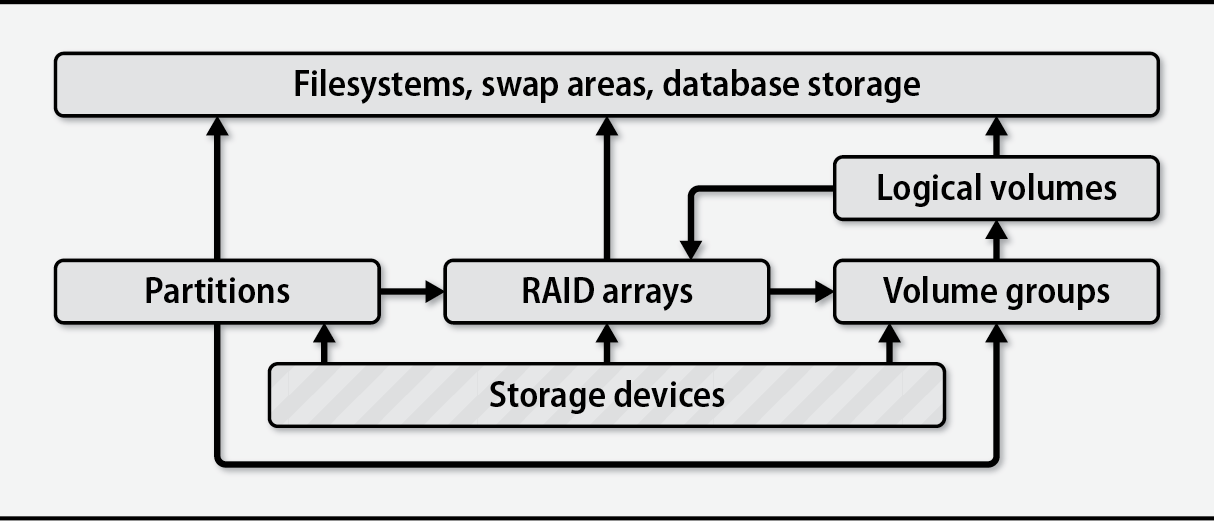
Brief overview of the layers (followed by in-depth):
- Partition: is a fixed-size subsection of a storage device. Each partition has its own device file and acts much like an independent storage device
- Volume groups and logical volumes are associated with logical volume managers (LVMs). These systems aggregate physical devices to form pools of storage called volume groups. An administrator can then subdivide this pool into logical volumes in much the same way that disks can be divided into partitions. For example, a 6TB disk and a 2TB disk could be aggregated into an 8TB volume group and then split into two 4TB logical volumes.
- RAID array (a redundant array of inexpensive/independent disks) combines multiple storage devices into one virtualized device. Depending on how you set up the array, this configuration can increase performance, increase reliability, or both. RAID can be implemented by the operating system or by various types of hardware.
Although logical volume managers did not originally function as RAID controllers, most have absorbed some RAID-like features (notably, striping and mirroring).