Partitioning
Partitioning and logical volume management are both ways of dividing up a disk (or pool of disks, in the case of LVM) into separate chunks of known size.
Question
What’s the point of dividing a disk into chunks (paritions and logical volumes)?
Answer
Partitions and logical volumes make backups easier, prevent users from poaching each other’s disk space and confine potential damage from runaway programs.
Partitioning is generally worse than logical volume management. The only advantages of partitioning over logical volume management are its and the fact that. A few versions of UNIX that run on proprietary hardware have done away with partitioning altogether, and nobody on those systems seems to miss it. Pros and cons of paritioning:
Pros
- simplicity
- Windows and PC BIOSs understand and expect it
Cons
- It’s coarse and brittle and lacks features
- Partitioning decisions are difficult to revise later.
Paritioning
Systems that support partitions implement them by writing a “label” at the beginning of the disk to define the range of blocks included in each partition.
Note
Use
partedorgparted(GUI) to create paritions. See Adding a disk
Only two partitioning schemes are used these days: MBR and GPT.
Simply these are just different formats to define ranges of blocks.
MBR (1980s)
MBR (Master Boot Record) partitioning is an old Microsoft standard.
It’s a ill-conceived format that can’t support disks larger than 2TB.
MBR offers no advantages over GPT except that it’s the only format from which old PC hardware can boot Windows. Unless you’re forced by circumstances to use MBR partitions, you typically don’t want them. Unfortunately, MBR is still a common default setup for many distributions’ installers.
GPT (1990s)
GPT (GUID Partition Table) was developed as part of the Unified Extensible Firmware Interface (UEFI) by Intel. It was created to overcome MBR’s weaknesses
- larger than 2TB
- up to 128 primary paritions on a single drive
Each partition has a type specified by a 16-byte ID code (a globally unique ID, or GUID).
- Windows (Vista+): GPT data support; boot only on EFI firmware
- Linux/GRUB: Full GPT support; boots on any system
- macOS (Intel): EFI + GPT bootable
Basically super old motherboards (BIOS only), need MBR. GPT needs UEFI.
Suggestions on what to paritition
Example of partitioning
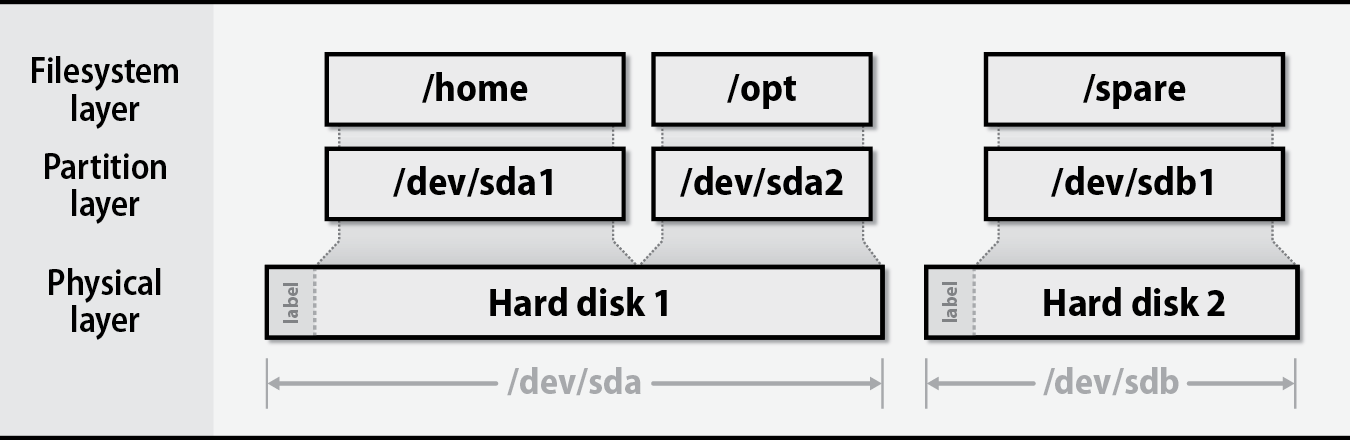
The following are suggestions to limit runaway users or programs from filling the root paritition which would halt the system:
/var/log/or/var/home/limit users/tmpcan grow unexpectedly and to avoid backing it up/optrunning applications should be isolated