Docker
Last edited
Docker, Inc.’s primary product is a client/server application that builds and manages containers.
Architecture
dockeris an executable command that handles all management tasks for the Docker system. -dockerdis the persistent daemon process that implements container and image operations.dockercan run on the same system asdockerdand can communicate with it through UNIX domain sockets, or it can contactdockerdfrom a remote host over TCP
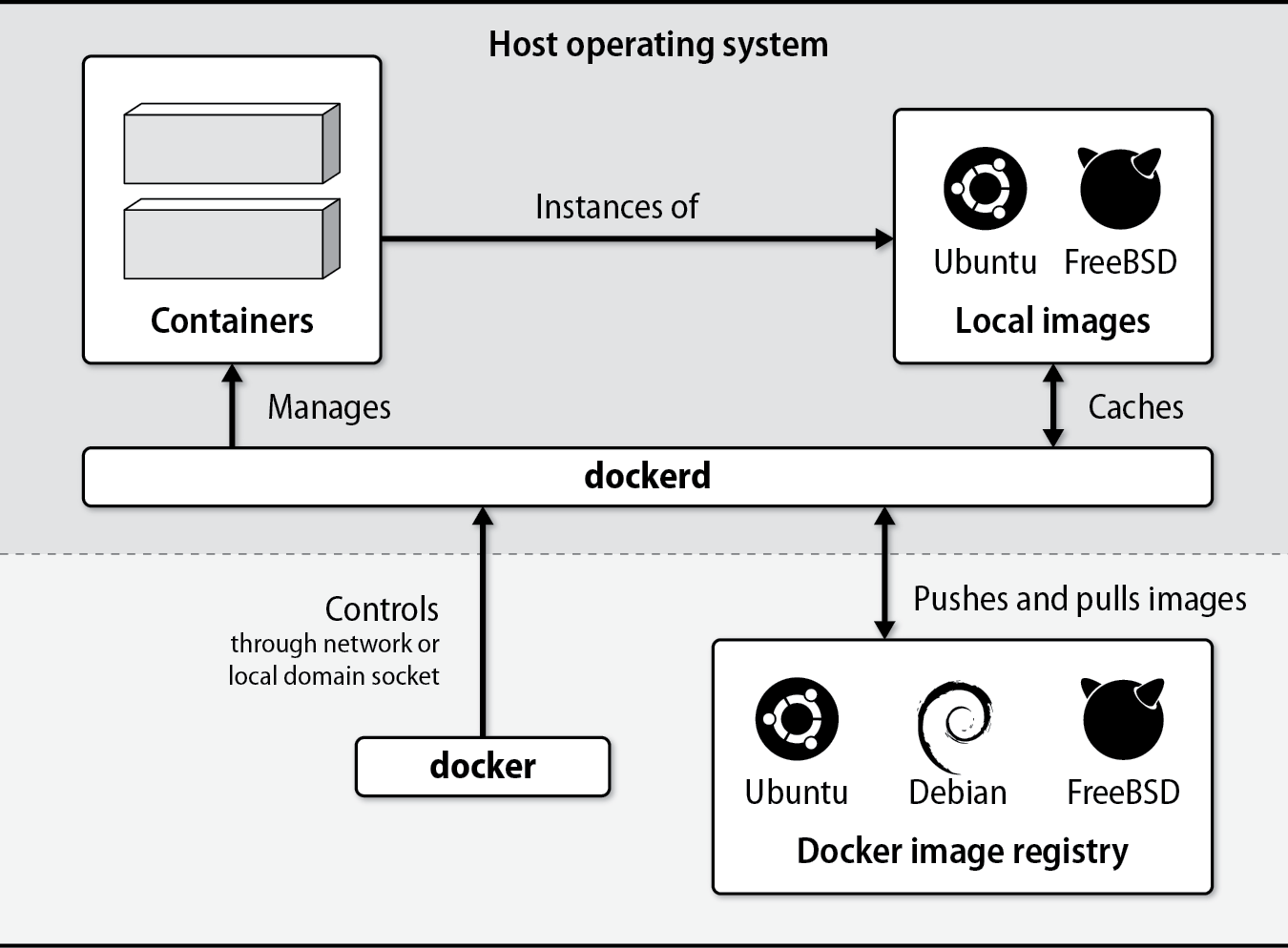
Commands
docker info       # Displays summary information about the daemon
docker ps         # Displays running containers
docker version    # Displays extensive version info about the server and client
docker rm         # Removes a container
docker rmi        # Removes an image
docker images     # Displays local images
docker inspect    # Displays the configuration of a container (JSON output)
docker logs       # Displays the standard output from a container
docker exec       # Executes a command in an existing container
docker run        # Runs a new container
docker pull/push  # Downloads images from or uploads images to a remote registry
docker start/stop # Starts or stops an existing container
docker top        # Displays containerized process status
Install
Users in the docker group can control the Docker daemon through its socket, which effectively gives those users root privileges. This is a significant security risk, so we suggest that you use sudo to control access to docker rather than adding users to the docker group. In the examples below, we run docker commands as the root user.
TODO: FINISH Docker
Containers in Practice
Best practices
- When your application needs to run a scheduled job, don’t run cron in a container. Use the cron daemon from the host (or a systemd timer) to schedule a short-lived container that runs the job and exits.
- Don’t ssh to instances (ideally you shouldn’t have sshd running anyways in the container), access the host and
docker execin - Ignore the advice “one process per container”. Split processes into separate containers only when it makes sense to do so. For example, it’s usually a good idea to run an application and its database server in separate containers because they are separated by clear architectural boundaries. It’s perfectly OK to have more than one process in a container when that’s appropriate.
Logging
Containers do not run syslog. Instead, Docker collects the logs for you through logging drivers. Container processes need only write logs to STDOUT and errors to STDERR.
Important
If your software supports logging only to files create symbolic links from log files to
/dev/stdoutand/dev/stderrwhen you build the image.
Docker forwards the log entries it receives to a selectable logging driver:
| Driver | What it does |
|---|---|
json-file | Writes JSON logs in the daemon’s data directory (default) ᵃ |
syslog | Writes logs to a configurable syslog destination ᵇ |
journald | Writes logs to the systemd journal ᵃ |
gelf | Writes logs in the Graylog Extended Log Format |
awslogs | Writes logs to the AWS CloudWatch service |
gcplogs | Writes logs to Google Cloud Logging |
none | Does not collect logs |
ᵃ Log entries stored this way are accessible through the docker logs command.
ᵇ Supports UDP, TCP, and TCP+TLS.
Container Clustering and Management
Docker engine is responsible only for individual containers, not for answering the broader question of how to run many containers on distributed hosts in a highly available configuration. That’s the role of Kubernetes.