Web Software
Last edited
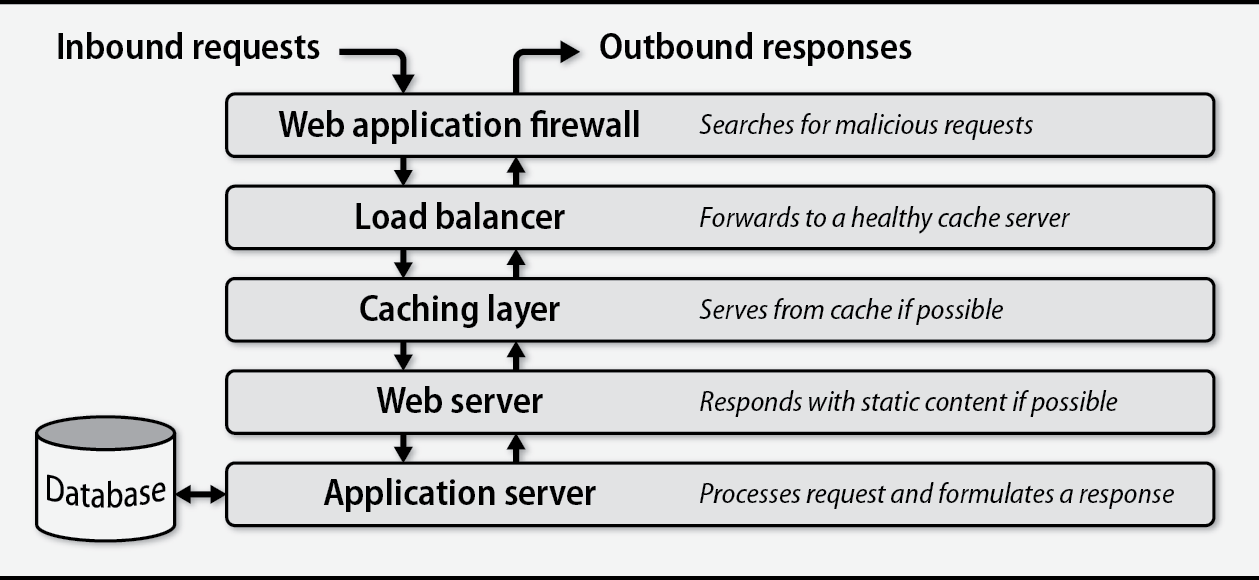
Web servers and HTTP proxy software
Features provided by web servers:
- Virtual hosts, allowing many sites to coexist peacefully within a single server
- Handling of TLS connections
- Configurable logging that tracks requests and responses
- HTTP basic authentication
- Routing to different downstream systems according to requested URLs
- Execution of dynamic content through application servers
Go and node.js have web severs built interally, they can handle HTTP without the need for seperate web servers.
NGINX is the recommended web server for production usage.
Load balancers
- Load balancers typically operate at layer 4 of OSI. They route requests based on IP and port.
- However they can operate at layer Layer 7 by inspecting requests and routing them according to their target URL, cookie values or other HTTP headeres.
As an added bonus, load balancers can improve security.
- They usually reside in the DMZ portion of a network and proxy requests to web servers behind an internal firewall.
- If HTTPS is in use, they also perform TLS termination: the connection from the client to the load balancer uses TLS, but the connection from the load balancer to the web server can be vanilla HTTP. This arrangement offloads some processing overhead from the web servers.
Sticky sessions
Pithy
What are sticky session: proxy servers (HAProxy, etc.) can insert a cookie it’s own responses. Any future request form the same will include the cookie, the porxy server will use the value of the cookie to route the request back to the same server.
Caches
Caches live between clients and web servers and store the results of the most frequent requests, sometimes in memory. They can then intervene to answer requests for which they know the correct response, reducing load on the authoritative web servers and improving response times for users.
In caching jargon, an origin is the original content provider
You can use curl -H “Cache-Control: no-cache” to politely request a cache refresh. This is the same as invoking
Proxy Cache
You can install a proxy cache at the edge of an organization’s network to speed up access for all users. When a user loads a web site, the requests are first received by the proxy cache
You can configure a proxy cache in two ways: actively, by changing users’ browser settings to point to the proxy; or passively, by having a network router send all web traffic through the cache server
Content Delivery Networks (CDNs)
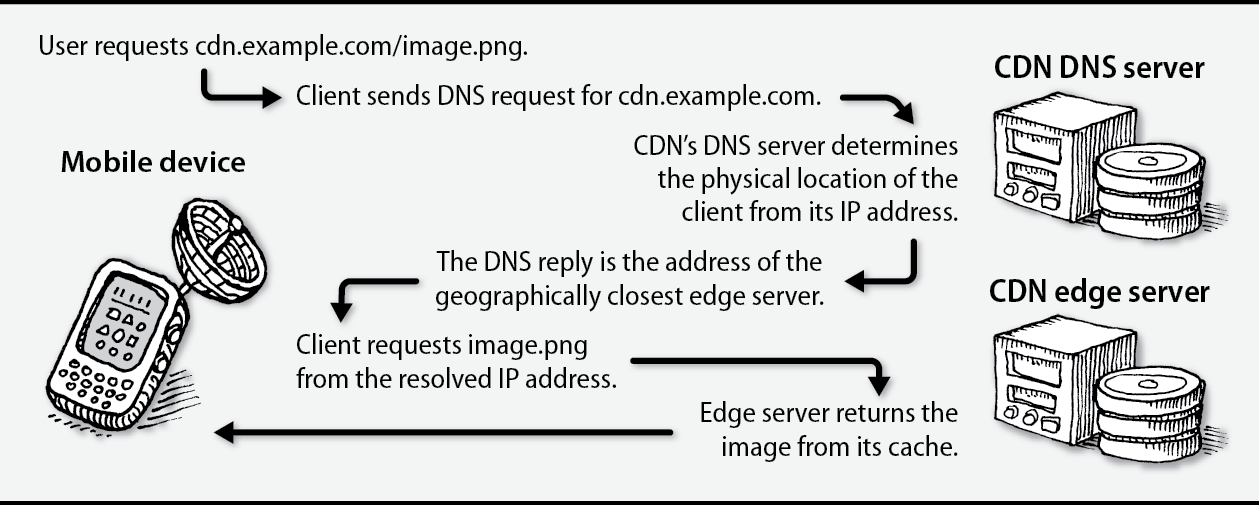
A content delivery network (CDN) is a globally distributed system that improves web performance by moving content closer to users
When clients request content from a site that uses a CDN, they are routed to the closest node (called an edge server), thereby decreasing latency and reducing congestion for the origin.
Edge servers are similar to proxy caches. They store copies of content locally. If they don’t have a local copy of a requested resource or if their version of the content has expired, they retrieve the resource from the origin, respond to the client, and update their cache.
APIs
An API defines a set of methods through which a remote system can make use of an application’s data and services.
Web API calls are normal HTTP requests. They’re only “APIs” because the client and server have agreed, by convention, that certain URLs and verbs have specific meanings and effects within the domain of their interaction.
REST
REST (Representational State Transfer) is an architectural style of API design
applied to web services that 1) explicitly use HTTP verbs to communicate intent, and 2) use a directory-like path structure to locate resources. Most REST APIs use JSON as their underlying representation for data.
SOAP (not used anymore)
SOAP (Simple Object Access Protocol)
An older, rigid protocol for HTTP APIs that routes all calls through a few URLs using a heavy XML format, making payloads large and development cumbersome.
Web hosting in the cloud
For the sake of efficiency, we prefer to rely on vendor services when possible. Specifcally for load balancer, unless the ELB lacks a specific feature that you need, it is clearly the expedient choice.
Important
For the sake of your own sanity, avoid the building option unless the function in question is a core competence for your business.
Apache HTTPD
httpd is both the name given to the daemon’s binary and to the project. Ubuntu has taken the liberty of renaming httpd to apache2, which matches the name of the apt package but otherwise does little more than create confusion.
Although an entire httpd configuration can be contained in a single file, OS maintainers typically use the Include directive to split the default configuration into multiple files and directories
| RHEL/CentOS | Debian/Ubuntu | FreeBSD | |
|---|---|---|---|
| Package name | httpd | apache2 | apache24 |
| Config root | /etc/httpd | /etc/apache2 | /usr/local/etc/apache24 |
| Primary config file | conf/httpd.conf | apache2.conf | httpd.conf |
| Module config | conf.modules.d/ | mods-available/ mods-enabled/ | modules.d/ |
| Virtual host config | conf.d/ | sites-available/ sites-enabled/ | Includes/ |
| Log location | /var/log/httpd | /var/log/apache2 | /var/log/httpd-*.log |
| User | apache | www-data | www |
Debian and Ubuntu approach Apache config wierdly. In our experience, the Debian system is unnecessary and overly complex. A simple site-configuration subdirectory usually provides sufficient structure. If you’re running Debian or Ubuntu, though, it makes sense to stick with their defaults.
Virtual host configuration
When an HTTP request arrives, httpd identifies which virtual host to select by consulting the HTTP Host header and network port. It then matches the path portion of the requested URL to a Files, Directory, or Location directive to determine how to serve the requested content. This mapping process is known as request routing.
Logging HTTP
Keep web server logs on a dedicated partition to prevent a large log file from affecting the rest of the system. On most Linux distributions, the default package installation of Apache includes an appropriate logrotate configuration