10 Collaboration
Last edited
Write Docstrings
Each module, class, public function, method should have a docstring.
Modules
The goal of this docstring is to introduce the module and its contents
# <module purpose>
"""
Testing how words relate to each other can be tricky sometimes!
This module provides easy ways to determine when words you've
found have special properties.

Available functions:
- palindrome: Determine if a word is a palindrome.
- check_anagram: Determine if two words are anagrams.
"""
Classes
The body should describe:
- Important public attributes and methods
class Player:
    # classes purpose
    """Represents a player of the game.

    Subclasses may override the 'tick' method to provide
    custom animations for the player's movement depending
    on their power level, etc.

    Public attributes:
    - power: Unused power-ups (float between 0 and 1).
    - coins: Coins found during the level (integer).
    """
Functions
The body should describe:
- Any specific behaviors and the args of the function
- Any return values
- Any exceptions and when they’re raised
- If the function returns
Nonedon’t mention it - If you don’t expect a function to raise an exception during normal operation, don’t mention the Exception
- If a function has arguments with default values, those defaults should be mentioned
- DON’T repeat information in the type annotations
def find_anagrams(word, dictionary):
    # description of what the function does
    """Find all anagrams for a word.

    This function only runs as fast as the test for
    membership in the 'dictionary' container.

    Args:
        word: String of the target word.
        dictionary: `collections.abc.Container` with all
            strings that are known to be actual words.

    Returns:
        List of anagrams that were found. Empty if
        none were found.

    Raises:
        ValueError: If `word` is empty.
    """
Use __all__ for Stable APIs
2 Stable APIs
Importers of your package will read functions, attributes, etc from your __all__ dictionary. You can choose to explicity control what is exposed instead of letting python generate it for your package.
__all__ = ['simulate_collision']

def _dot_product(a, b):
    ...

def simulate_collision(a, b):
    ...
The best part of this, cosumers of the public api won’t need to import by nested name space, they can just import directly
# __init__.py
# I've exposed models and utils under the same package
__all__ = []
from . models import *

__all__ += models.__all__
from . utils import *
__all__ += utils. __all__
Consumers have a super clean API now, they just import the top level package and I handle the routing
# Before:
# If I change the structure of my packages, so does a consumer
from mypackage.physics.models import Projectile
from mypackage.physics.calculations import calculate_distance
# After:
from mypackage import Projectile, calculate_distance
Note
If you’re building an API for use between your own modules, the functionality of
__all__is probably unnecessary and should be avoided. The namespacing provided by packages is usually enough for a team of programmers to collaborate on large amounts of code they control while maintaining reasonable interface boundaries.
Define a Root Exception to Insulate Callers from APIs
When defining a module’s API, the exception you raise are just as much part of your interface as the functions and classes you define.
There’s a draw to using the builtin exception types, instead of defining your own new types.
raise ValueError('Density must be positive')It’s must more powerful to define a new hierarchy of exceptions.
# my_module.py
class Error(Exception):
    """Base-class for all exceptions raised by this module."""

class InvalidDensityError(Error):
    """There was a problem with a provided density value."""

class InvalidVolumeError(Error):
    """There was a problem with the provided weight value."""

def determine_weight(volume, density):
    if density < 0:
        raise InvalidDensityError('Density must be positive')
    if volume < 0:
        raise InvalidVolumeError('Volume must be positive')
    if volume == 0:
        density / volume
Have a root exceptions in a module makes it easy for consumers of an API to catch all the exceptions that were raised ON PURPOSE.
try:
    weight = my_module.determine_weight(1, -1)
except my_module.Error:
   logging.exception('Unexpected error')

# ...
# raise InvalidVolumeError('Volume must be positive')
# InvalidVolumeError: Volume must be positive
Theres 2 advantages to this:
It lets consumers have a chance to catch a ‘real’ error that my code wasn’t intended to catch
try:
    weight = my_module.determine_weight(0, 1)
except my_module.InvalidDensityError:
    weight = 0
# errors I deliberately raised
except my_module.Error:
    logging.exception('Bug in the calling code')
# errors I didnt explicity raise (something in my code is wrong)
# and the user should have a chance to process differently
except Exception:
    logging.exception('Bug in the API code')
    raise # Re-raise exception to the caller

>>>
Bug in the API code
Traceback (most recent call last):
# ...
ZeroDivisionError: division by zero
Future proofing an API.
I can easily add a subclass that is more specific and consumer code will continue to work and can catch the more specific error later if they see fit# Inherits my old error that users already used to catch # and provied a more specific error class NegativeDensityError(InvalidDensityError): """A provided density value was negative.""" ... def determine_weight(volume, density): if density < 0: raise NegativeDensityError('Density must be positive') ...This can be pushed even further by definig a board set of exceptions below the root, for even better future proofing
This generic errors will give an easy starting point for me and my consumers.
class Error(Exception):
    """Base-class for all exceptions raised by this module."""

class WeightError(Error):
    """Base-class for weight calculation errors."""

class VolumeError(Error):
    """Base-class for volume calculation errors."""

class DensityError(Error):
    """Base-class for density calculation errors."""
Circular Dependencies
Example
# 1) app.py
import dialog
prefs = {"save_dir": "/docs"}
dialog.show()

# 2) dialog.py
import app
save_dir = app.prefs["save_dir"] # this loads before 'prefs = ..' in app
def show():
    print(save_dir)

# 0) main.py
import app
How does it work?
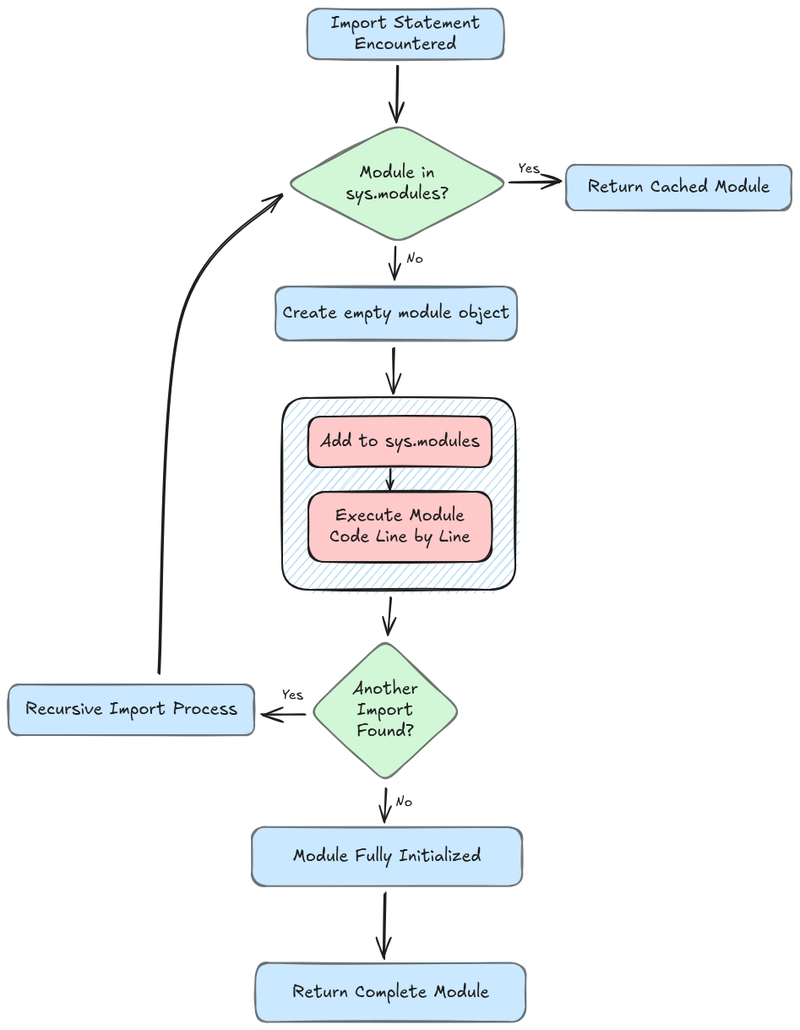
When a module is imported, here’s what Python actually does, in depth-first order:
- search for a module in
sys.pathlist - loads the code from the module and ensure it compiles (
.pyc) - creates a empty module obj
- inserts the module in
sys.moduleslist - Runs the code in the module object to define it’s contents
Problem
- the attributes of a module aren’t defined until the code for those attributes has executed (
step 5) - But the module can be loaded with the
importstatement immediately after it’s inserted into sys.modules
So you see, we’ve made the module accessible but there’s no methods, attributes or functions loaded
This image is can probably replace above?
Solutions
The best solutions a refactor. Take the code that is shared and extract it out so it’s
# prefs.py ---------------------------------
# New file with the part that dialog needed to import
# that used to be in app.py.
prefs = {"save_dir": "/docs"}


# app.py ----------------------------------
import dialog

def run():
    dialog.show()


# dialog.py -------------------------------
import prefs

def show():
    save_dir = prefs.prefs["save_dir"]
    print(save_dir)


# main.py ---------------------------------
import app

app.run()
Other options
3 ways to fix this
reorder imports
This fix is not recommended, but it works
# app.py ---------------------------------
prefs = {"save_dir": "/docs"} # define before calling / running dialog

import dialog
dialog.show()
This works but it goes against PEP8 style, it’s brittle and difficult to read.
Import, Configure, Run
Have modules minimize side effects at import time.
I can have my modules only define functions, classes and constants.# app.py -------------------------------- import dialog prefs = {"save_dir": "/docs"} def configure(): pass # dialog.py ------------------------------- import app save_dir = None def configure(): global save_dir save_dir = app.prefs["save_dir"] def show(): print(save_dir) # main.py --------------------------------- import app import dialog # Configure after all imports are complete app.configure() dialog.configure() # Run dialog.show()Works but can be difficult to structure code this way. It also can make it harder to read because it seperates definition from config.
Dynamic Import
The simplest, use an
importstatement within a function or method. This is called dynamic importing because the module import happens when the program is running, not starting up.# dialog.py --------------------------------- class Dialog: ... save_dialog = Dialog() def show(): import app # Dynamic import save_dialog.save_dir = app.prefs["save_dir"] print(save_dialog.save_dir) # app.py --------------------------------- import dialog prefs = {"save_dir": "/docs"} dialog.show()In general, it’s good to avoid dynamic imports like this. The cost of the import statement is not negligible and can be especially bad in tight loops. By delaying execution, dynamic imports also set you up for surprising failures at runtime, such as SyntaxError exceptions