5 Databases
Last edited
Relational Databases
- Tables have a special column called the
primary keyholds a unique identifier for each row stored in the table. - Tables can also have columns called
foreign keys, which reference the primary key of a row in the same or another table.
These links between rows are called relationships and are the foundation of the relational database model.
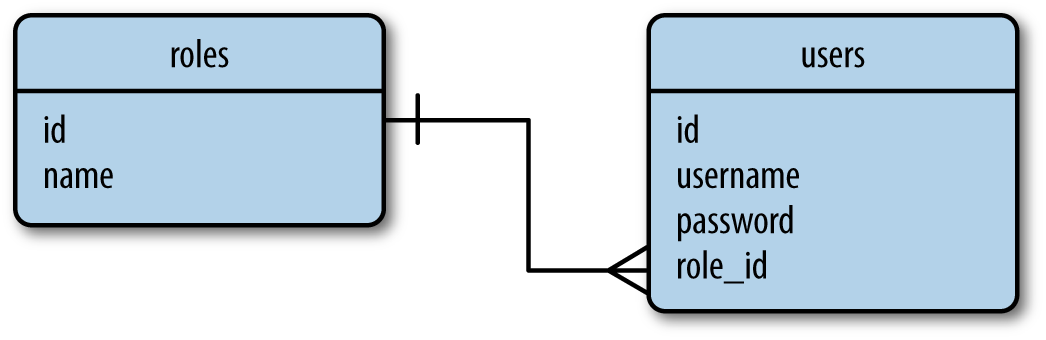
primary key - roles table stores the list of all possible user roles, each identified by a unique id
foregin key - The role_id column in the users table is a foreign key.
NoSQL Databases
Basically no relations, just standalone files. If you want to join you’d need to look into each table.
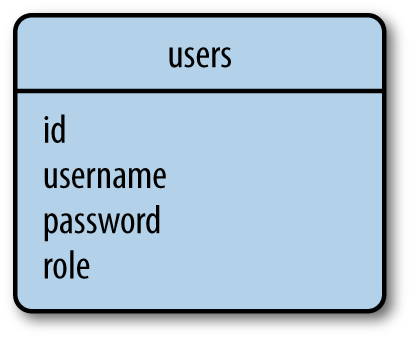
For the example above it would store the role name in each user row. Which would be expensive to rename a role for all users, but cheap to look up a user and their role since it’s just reading one role.
SQLAlchemy
db = SQLAlchemy(app)

class Role(db.Model):
    __tablename__ = 'roles'
    id = db.Column(db.Integer, primary_key=True)
    name = db.Column(db.String(64), unique=True)
    users = db.relationship('User', backref='role')

class User(db.Model):
    __tablename__ = 'users'
    id = db.Column(db.Integer, primary_key=True)
    username = db.Column(db.String(64), unique=True, index=True)
    role_id = db.Column(db.Integer, db.ForeignKey('roles.id'))
This code results in the following setup (no passowrd column)
When then used Flask-SQLAlchemy to create the database based on our classes
Launch a shell with the flask helper script which just activated the config objects and imports them to the shell
flask shell>>> from hello import db
>>> db.create_all()
# Create the tables - idk how but it takes our classes that inherted the db.ModelBuilding sql objects
Now that we have our tables we can use them to create roles and users using our classes
>>> from hello import Role, User
>>> admin_role = Role(name='Admin')
>>> mod_role = Role(name='Moderator')
>>> user_role = Role(name='User')
>>> user_john = User(username='john', role=admin_role)
>>> user_susan = User(username='susan', role=user_role)
>>> user_david = User(username='david', role=user_role)
Writing to the database
What are we doing here? Because we inherted db.Model, these classes create objects that can be written to the database, right on they only exist in python.
# We don't have an .id yet because the data needs to create this, but we haven't written to the database
print(admin_role.id)
None
db.session.add(admin_role)      # stages object in session (pending), no SQL yet
db.session.commit()             # flush -> INSERT
                                # DB returns the Primary Key (the part the database generated)
                                # SQLAlchemy writes it back onto the object
                                # the python object is now marked "Expired", meaning it may behind
                                #   from the DB, so next access has to read from the DB (SELECT)

print(admin_role.id)
1
Note
You could add multiple objects to the session with:
db.session.add_all([admin_role, mod_role, user_role, user_john, user_susan, user_david])
Commit writes all objects that were added to the session atomically.
If an error happens when writing to session, the session is discarded - the db is safe.
You can also rollback a session db.session.rollback() - any objects that were added to the database session are restored to the state they have in the database.
Modifying rows
The add() method of the database session can also be used to update models (not just add new entries).
>>> admin_role.name = 'Administrator'
>>> db.session.add(admin_role)
>>> db.session.commit()
Deleteing rows
>>> db.session.delete(mod_role)
>>> db.session.commit()
Querying Rows
>>> Role.query.all()
[<Role 'Administrator'>, <Role 'User'>]
>>> User.query.all()
[<User 'john'>, <User 'susan'>, <User 'david'>]

# Filtering
User.query.filter_by(role=user_role).all()
[<User 'susan'>, <User 'david'>]

# You can see the raw query
>>> str(User.query.filter_by(role=user_role))
SELECT users.id AS users_id, users.username AS users_username, users.role_id AS users_role_id
FROM users
WHERE ? = users.role_id
filters and selections
# Full example
User.query.filter_by(role="admin").order_by(User.name).limit(5).all()

# First filter down - each returns a new query (chainable, lazy)
query.filter(User.age > 18)          # additional filter to the original query
query.filter_by(name="alice")        # additional equality filter to the original query
query.limit(10)                      # limits the number of results to the given number
query.offset(20)                     # applies an offset into the list of results
query.order_by(User.name)            # sorts the results according to the given criteria
query.group_by(User.role)            # groups the results according to the given criteria

# Then trigger execution - these return results, not queries
.all()             # all the results as a list
.first()           # first result, or None if there are no results
.first_or_404()    # first result, or aborts with a 404 if there are no results
.get(5)            # row matching the given primary key, or None
.get_or_404(5)     # row matching the primary key, or aborts with a 404
.count()           # the result count of the query
.paginate(page=1, per_page=20)   # a Pagination object with the specified range of results
Migrations
Flask has a wrapper around a SQLAlchemcy framework for migrations called (Alembic)[http://bit.ly/alembic-doc]
The process of a migration:
- Make the necessary changes in the database models.
- Generate a migration with the flask
db migratecommand. - Review the generated migration script and correct it if it has any inaccuracies.
- Apply the changes to the database with the
flask db upgradecommand.