Flask Web Development
Miguel Grinberg (2018)
Starting the flask server
#1) interactively
export FLASK_APP=hello.py
export FLASK_DEBUG=1 # optionally enable debug mode
flask run

#2) programmatically
if __name__ == '__main__':
    app.run()
    app.run(debug=True) # optionally enable debugmode
Flask CLI
host flag
- By default, Flask’s development web server listens for connections on
localhost, so only connections originating from the computer running the server are accepted. - The following command makes the web server listen for connections on the public network interface, enabling other computers in the same network to connect as well
flask run --host 0.0.0.0ch01
Flask has 3 dependencies:
Flask has no native support for accessing databases, validating web forms, authenticating users, or other high-level tasks. These are available through extensions.
ch02
The association between a URL and the function that handles it is called a route.
adding a route
You can use the decorator
routePython@app.route('/') def index(): return '<h1>Hello World!</h1>'The more traditional way, which takes url, endpoint name and function name (closer to go’s
handleFunc())Pythondef index(): return '<h1>Hello World!</h1>' app.add_url_rule('/', 'index', index)
passing in dynamic input in the url
Any URLs that match the static portions will be mapped to this route, and when the view function is invoked, the dynamic component will be passed as an argument.
@app.route('/user/<name>')
def user(name):
    return '<h1>Hello, {}!</h1>'.format(name)
The dynamic components in routes are strings by default but can also be of different types.
For example: the route /user/<int:id> would match only URLs that have an integer in the id dynamic segment, such as /user/123
Supported types:
stringintfloatpath- The path type is a special string type that can include forward slashes, unlike the string type.
Request-Response Cycle
When Flask receives a request from a client, it needs to make a few objects available to the view function that will handle it.
Definition
View function: a function a webserver calls to handle a request for a URL, the function is responsible for generating what the user sees at that URL. This could be through delgating to other functions but ultimately it is responsible for the view.
How does Flask give the view function access to the request information (context)?
It could pass them in arguments, however that would add clutter.
Instead flask uses contexts to temporarily make certain objects globally accessible. In reality they’re not globals but a proxy that looks up the real request object that belongs to whatever thread is running.
from flask import request

@app.route('/')
def index():
    user_agent = request.headers.get('User-Agent')
    return '<p>Your browser is {}</p>'.format(user_agent)
What contexts do I have access to?
When writing view functions you have a access to 4 objects, all work view the same “fake global via proxy” way as request
from flask import current_app, g, request, sessionrequest- the incoming http request: url, headers form data, query stringsession- user cookies. a dictionary that persists across request from the same user (via a cookie). store something like `session[’name’] and it will be there when the same user makes the request and it will be there when the same user makes the request.g- scratch space that lasts one request only. useful for passing data between functions that during the same request.gstands for global variables during request, just a terse name.current_appis theFlaskobject itself (theappyou create withFlask(__name__)), mostly used to read configuration likecurrent_app.config['SECRET_KEY'])
Request dispatching (mapping URLs to endpoints)
>>> from hello import app
>>> app.url_map
Map([
 <Rule '/static/<filename>' (OPTIONS, GET, HEAD) -> static>, # default for static files
 <Rule '/'                  (OPTIONS, GET, HEAD) -> index>,
 <Rule '/user/<name>'       (OPTIONS, GET, HEAD) -> user>
])

# Context this the script this based on
@app.route("/")
def index():
    return '<h1>hello world!</h1>'

@app.route("/user/<name>")
def user(name: str):
    return '<h1>Hello, {}!</h1>'.format(name)
This is how Flask dispatches, this is a Map object form Werkzueg, that holds a list of Rule objects.
Each Rule has 3 parts:
/user/<name>- URL(OPTIONS, GET, HEAD)- http methods the route accepts (options and head added by default)-> user- view function to run
flask.request
Contains all the information that the client included in the HTTP request.
# All the body data
request.form          # form fields dict
request.args          # query string args dict
request.cookies       # cookies dict
request.headers       # HTTP headers dict
request.files         # file uploads dict
request.get_data()    # raw request body
request.get_json()    # parsed JSON body dict

# Flast metadata
request.blueprint     # The name of the Flask blueprint that is handling the request.
request.endpoint      # The name of the Flask endpoint that is handling the request (the view function name).

# Lots of query information
request.is_secure()   # Returns True if the request came through a secure (HTTPS) connection.
request.method        # The HTTP request method, such as GET or POST.
request.host,path,query_string,etc...
Request Hooks
Sometimes you want to run things before or after each request (e.g., create a database conn or authenticate a user).
Hooks are implemented as decorators, there are 4:
before_request- registers a function to run before each request.before_first_request- registers a function to run only before the first request is handled. Good for init a server.after_request- registers a function to run after each request, but only if no unhandled exceptions occurred.teardown_request- registers a function to run after each request, even if unhandled exceptions occurred.
A common pattern to share data between request hook functions and view functions:
- use the
gcontext global as storage.
Example:
- a
before_requesthandler can load the logged-in user from the database and store it ing.user - later, when the view function is invoked, it can retrieve the user from there
Responses
When Flask invokes a view function, it expects its return value to be the response to the request. In most cases the response is a simple string that is sent back to the client as an HTML page.
@app.route('/')
def index():
    return '<h1>Bad Request</h1>', 400
You can also send a 3rd argument, a dict of headers to send back.
@app.route('/')
def index():
    response = make_response('<h1>This document carries a cookie!</h1>')
    response.set_cookie('answer', '42')
    return response
There’s a few other options for view functions
abort(404) # creates an exception
return redirect('http://www.example.com') # sends a 302
Ch3 - Jinja
Ch4 - Webforms
app.config
The app.config dictionary is a general-purpose place to store configuration variables used by Flask, extensions, or the application itself.
app.config['SECRET_KEY'] = 'hard to guess string'flask_wtf
Is a handy package for creating forms, it has helpers and lets you easily define and parse a form.
class NameForm(FlaskForm):
    name = StringField("What is your name", validators=[DataRequired()])
    submit = SubmitField("Submit")

@app.route('/', methods=['GET', 'POST'])
def index():
    name = None
    form = NameForm()
    # True if the form was submitted
    # and validated by all the field validators in the type
    # if not valid it returns false and thus it will render a normal "GET" response
    if form.validate_on_submit():
        name = form.name.data
        form.name.data = ''
    return render_template('index.html', form=form, name=name)
The book later moves to injecting the data using session cookies and reading from it.
@app.route("/", methods=["GET", "POST"])
def index():
    form = NameForm()
    if form.validate_on_submit():
        session["name"] = form.name.data
        return redirect(url_for("index"))
    return render_template("index.html", form=form, name=session.get("name"))
flash()
A function from flask used to flash pop up methods, you retrive and handle in Jinja with get_flashed_messages()
@app.route("/", methods=["GET", "POST"])
    ...
flash("Looks like you changed your name!"){% for message in get_flashed_messages() %}
<div class="alert alert-warning">
<button type="button" class="close" data-dismiss="alert">×</button>
{{ message }}
</div>Ch5 - Databases
Relational Databases
- Tables have a special column called the
primary keyholds a unique identifier for each row stored in the table. - Tables can also have columns called
foreign keys, which reference the primary key of a row in the same or another table.
These links between rows are called relationships and are the foundation of the relational database model.
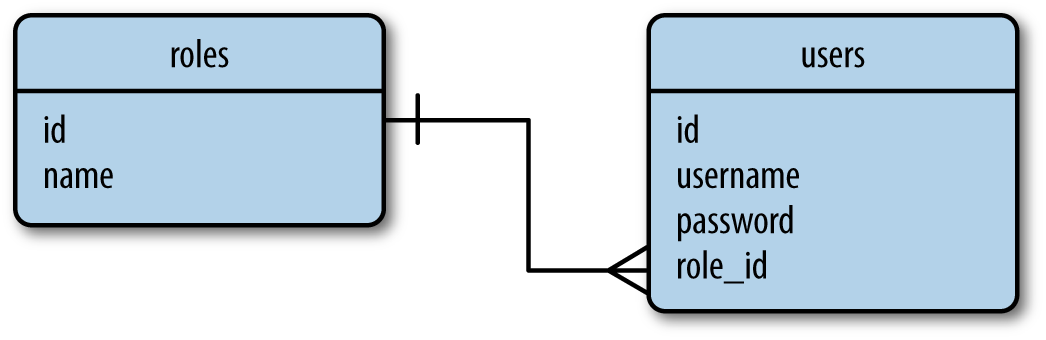
primary key - roles table stores the list of all possible user roles, each identified by a unique id
foregin key - The role_id column in the users table is a foreign key.
NoSQL Databases
Basically no relations, just standalone files. If you want to join you’d need to look into each table.
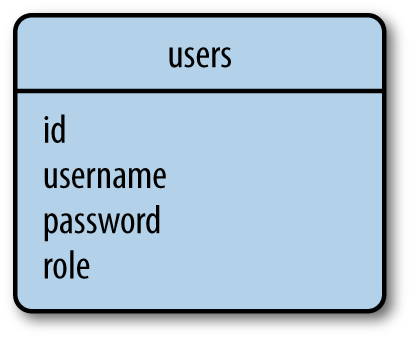
For the example above it would store the role name in each user row. Which would be expensive to rename a role for all users, but cheap to look up a user and their role since it’s just reading one role.