3 Packages
Last edited
No diff between a regular and namespace package for the consumer, __init__.py just runs at import time.
“Package” in python is overloaded it can mean three things
- import packages - a module that can contain other modules/packages
- regular package - has
__init__.py - namespace package - no
__init__.py
- regular package - has
- distribution package - a zip of your code plus a bit of metadata (name, version, dependencies) that lets pip and other tools install it
This chapter is about distribution packages.
Why Packaging?
Why not just copy around modules, it’s simpler, requires no tooling, no building?
- Installing multiple files is annoying for use, packages let you install scripts in a single command in a portable and safe way.
- Packaging lets you declare dependencies on other packages, which installers satisfy automatically without users worrying about installing them.
- Updating and sharing updates is easier with packaging.
- Extension packages (compiled c or rust) is easy to share the prebuilt binary
What’s the overhead?
You make a declarative file named pyproject.toml into your project, a file that specifies metadata and its build system.
pyproject.toml
[project]
name = "bacon-ip-mj"
version = "0.1"

[project.scripts]
baconip = "script.py:main"

[build-system]
requires = ["hatchling"]
build-backend = "hatchling.build"
at the top level pyproject.toml can have up to three sections
[project]- project metadata[build-system]- how to build packages for the project[tool]- tool configuration like[tool.ruff]
Building a package
The relevant config for pyproject
[build-system]
requires = # list of packages required to build
build-backend = # import name of build backend
build-path = # (optional) path for build backend
Once we have our pyproject.toml we can use build
pipx run build

./dist
xxx.whl
xxx.tar.gz
This is the simplified version of what the build frontend and backend do to create the package
py -m venv buildenv
buildenv/bin/python -m pip install hatchling
buildenv/bin/python
>>> import hatchling.build as backend
>>> backend.get_requires_for_build_wheel()
[]  # no additional build dependencies requested
>>> backend.build_wheel("dist")
'random_wikipedia_article-0.1-py2.py3-none-any.whl'- build frontends:
build,pip,uvand the project managers which are backend agnostic as wellRye,Hatch
Actually publishing a package to PyPI
I’m going to publish to their test instance - https://test.pypi.org/
I’m using twine to publish the package
pipx run build
pipx run twine upload --repository=testpypi dist/*
Uploading distributions to https://test.pypi.org/legacy/
WARNING  This environment is not supported for trusted publishing
Enter your API token:
Uploading subnetting_game_lib-0.2-py3-none-any.whl
100% ━━━━━━━━━━━━━━━━━━━━━━━━━━━━━━━━━━━━━━━━ 12.1/12.1 kB • 00:00 • ?
Uploading subnetting_game_lib-0.2.tar.gz
100% ━━━━━━━━━━━━━━━━━━━━━━━━━━━━━━━━━━━━━━━━ 10.1/10.1 kB • 00:00 • ?
View at:
https://test.pypi.org/project/subnetting-game-lib/0.2/
That’s it now it can be installed anywhere
uv pip install -i https://test.pypi.org/simple/ subnetting-game-lib==0.2Notably I didn’t pin a requests version in my pyproject.toml and it broke the install of the package, I had to go back and pin a version.
Then I upgraded my venv of the client using the package
uv pip install -i https://test.pypi.org/simple/ --upgrade subnetting-game-libInstalling Projects from Source
Question
What’s the usecase? Why wouldn’t I install the wheel through pip or just import the source files using the file system?
Answer
Two reasons you would want to install a project from source:
- Test the package as an installed package - you’re going to share a package and you want to test the result exactly as a user would
- Develop a project that uses itself as a package You’re working directly in source code that has the package as a dependency. Think
sherlock, I needed topip install -e .because the cli refer to the package and the package was in the same source folder that I was changing.- *Install the projects entry point (
[projects.scripts]) -pip install ., now i can usesherlock
You can install your project directly from a source directory:
uv venv
uv pip install .
Or it be easier to hot-reload.. see below
Hot reloading from source
Tip
We’re basically emulating a built package with this, you’re creating a link that points to your source files but the interface for the consumer of the package is the exact same.
# Install the pyproject in the current folder so it's hot reloaded
uv pip install --editable .
uv pip install -e .

# If you want to make globally available
pipx install --editable .
Now when you make changes you don’t need to reinstall, only if you make changes to the pyproject.toml to change metadata or dependencies.
Understanding __init__.py and __main__.py
# cwd /project
py -m src.subnetting

project/
└── src/
    └── subnetting/
        ├── __init__.py
        └── __main__.py
The only required part to execute a module like this is __main__().py, which is just hard coded into the -m flag to look for an execute.
So roughly the flow of executing a module directly looks like this:
- resolve the package path, executing each
__init__.pyalong the way - run the
__main__.pyof the final module in the path
If the target is a package, Python looks for package.__main__.
If the target is a module (python -m http.server), it executes that module directly.
python -m src.subnetting.cli

import src                # executes src/__init__.py if present
import src.subnetting     # executes subnetting/__init__.py if present
import src.subnetting.cli # executes cli/__init__.py if present
execute src.subnetting.cli.__main__
Note
Imports never need
__init__.py, but tooling often uses it to find packages:
- hatchling - auto-detects
src/<name>/__init__.py, without it the build fails unless you set[tool.hatch.build.targets.wheel] packages = ["src/<name>"]- setuptools
find_packages()- silently skips the dir, empty wheel (find_namespace_packages()doesn’t)- unittest discovery, older mypy - also skip it
So add an empty one anyway.
Project Layout
Why do we use the /src package convention?
Pithy
basically: python interface to run a module can shadow an installed package if the directory is flat
Problem
Module is at project root:
random-wikipedia-article
├── pyproject.toml
└── random_wikipedia_article.py- You build the package with
build py -m random_wikipedia_articleputs CWD at the front ofsys.path, findsrandom_wikipedia_article.pyand runs it.- The installed wheel is not used.
Solution (/src)
random-wikipedia-article
├── pyproject.toml
└── src
    └── random_wikipedia_article
        ├── script.py
        ├── __init__.py
└── __main__.py- CWD is still on sys.path, but there’s nothing importable at the root anymore
- random_wikipedia_article only exists inside
src/, which isn’t on the path. py -m random_wikipedia_articleis forced to resolve to the installed wheel
Rye for managing packages
Some tools take over all of package management (Poetry), where-as Rye is built to work alongside single purpose tools (more the Unix approach).
It basically just provides a better workflow for a package.
uv init test-repo --package

├── .git
├── .gitignore
├── pyproject.toml
├── README.md
└── src
    └── test_repo
        └── __init__.py

rye build
rye publish -r testpypi --repository-url https://test.pypi.org/legacy/
rye sync
Note
Idk if this is really “useful” other than setup
Wheels and Sdists
Running build creates two packages for you project:
random_wikipedia_article-0.1.tar.gz               # sdist
random_wikipedia_article-0.1-py2.py3-none-any.whl # wheel- wheel - PyPI used to be called Cheese Shop, so wheel was a “wheel of cheese”
- sdist - Source distribution
both have the source code, the wheel is pre-arranged install ready, while the sdist is build ready (since it’s used to build the wheel)
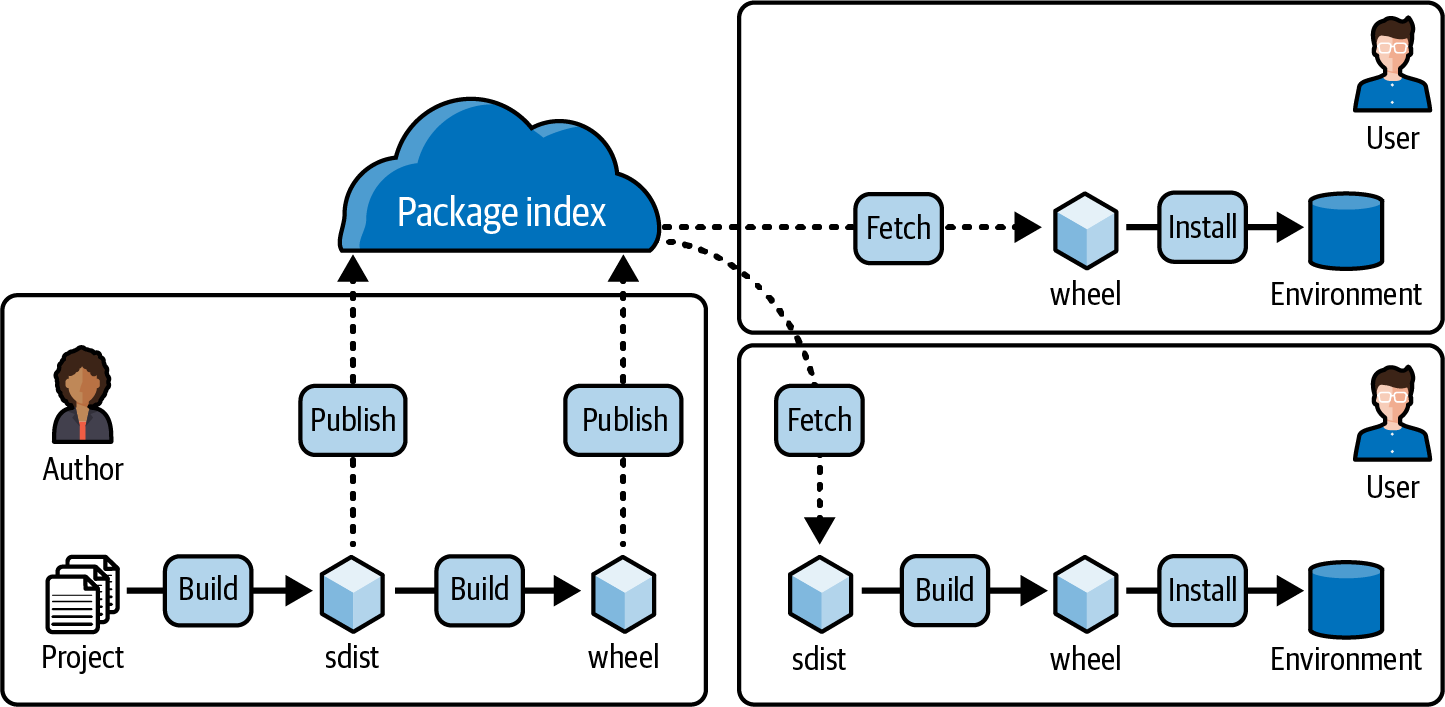
Compatibility tags
Installers pick right wheel based on the name
numpy-1.24.0-cp311-cp311-macosx_10_9_x86_64.whl
- python tag -
cp311CPython 3.11 - ABI tag -
macosx - platform tag - x86_64
Project Metadata
Two required fields are project.name and project.version
Note
I skipped a lot of the project fields, there’s a lot but most are self-explanatory
Entry-point scripts [project.scripts]
Make a shell shortcut to run a function.
[project.scripts]
random-wikipedia-article = "random_wikipedia_article:main"
User’s can now invoke via:
random-wikipedia-articleEntry points
Similar to entry point scripts above, but it’s for other programs to call your functions.
This is useful for something like pytest to call your exposed functions.
[project.entry-points.some_application]
my-plugin = "my_plugin.submodule:plugin"
Required python version
The Required Python Version, it’s recommended to require the oldest Python version that still receives security updates. https://devguide.python.org/versions/
[project]
requires-python = ">=3.8"
The reasons to be restrictive about your python version:
- use of new python language features
- use of new stdlib features
- use of third-party packages that they themselves require python version