3 Compound data types
Last edited
Return Types
Special return types
()‘unit type’ formally as a zero-length tuple. Use when you’re returning nothing!’ this function never returns (infinite loop, panics)
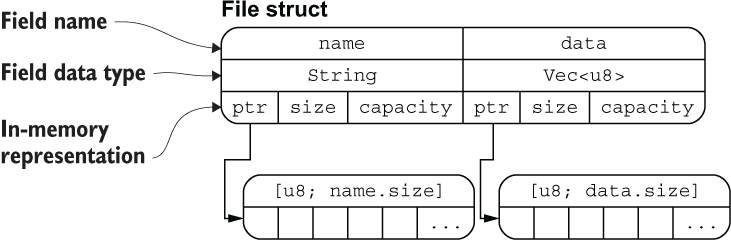
struct
Example
#[derive(Debug)] // like a decorator? which allows for repr? {:?}
struct File {
    name: String,
    data: Vec<u8>,
}

fn main() {
    let f1 = File {
        name: String::from("f1.txt"),
        data: Vec::new(),
    };

    // We want to access this data by reference
    // f1_name is 'borrowing' the data these refer to.
    let f1_name = &f1.name;
    let f1_length = &f1.data.len();

    println!("{:?}", f1);
    println!("{} is {} bytes long", f1_name, f1_length)
}
Type alias’
Downside, each new type (like our struct) must opt in to all of its intended behavior from String.
// Hostname is a considered a newtype
struct Hostname(String);

fn connect(host: Hostname) {
    println!("connected to {}", host.0);
}

fn main() {
    let ordinary_string = String::from("localhost");
    let host = Hostname(ordinary_string.clone());

    connect(ordinary_string);
}
// Had we defined Hostname like this, it would accept a string as well.
type Hostname(String)Methods with impl (implementation)
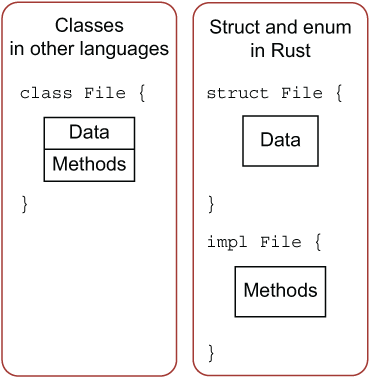
Rust has no class keyword, types are made with struct and methods are created with impl.
new() pattern
Very common way to build a constructor, effectively a method to run __init__. Callers can also just use the literal themselves.
struct File {
    name: String,
    data: Vec<u8>,
}

impl File {
    fn new(name: &str) -> File {
        File {
            name: String::from(name),
            data: Vec::new(), // do some lifting for the caller
        }
    }
}

let f3 = File::new("f3.txt");
File implementation
We’ve been building this throughout, here’s our file struct with its methods
#![allow(unused_variables)]
#[derive(Debug)] // compile macro, that generates basically __repr__
struct File {
    name: String,
    data: Vec<u8>,
}

impl File {
    fn new(name: &str) -> File {
        File {
            name: String::from(name),
            data: Vec::new(),
        }
    }

    fn new_with_data(name: &str, data: &Vec<u8>) -> File {
        let mut f = File::new(name);
        f.data = data.clone();
        f
    }

    fn read(self: &File, save_to: &mut Vec<u8>) -> usize {
        let mut tmp = self.data.clone();
        let read_length = tmp.len();
        save_to.reserve(read_length);
        save_to.append(&mut tmp);
        read_length
    }
}

fn open(f: &mut File) -> bool {
  true
}

fn close(f: &mut File) -> bool {
  true
}

fn main() {
    let f3_data: Vec<u8> = vec![114, 117, 115, 116, 33];
    let mut f3 = File::new_with_data("2.txt", &f3_data);

    let mut buffer: Vec<u8> = vec![];

    open(&mut f3);
    let f3_length = f3.read(&mut buffer);
    close(&mut f3);

    let text = String::from_utf8_lossy(&buffer);

    println!("{:?}", f3);
    println!("{} is {} bytes long", &f3.name, f3_length);
    println!("{}", text);
}
Returning errors
Note
unsafe- Consider unsafe to be a warning sign rather than an indicator that you’re embarking on anything illegal. Unsafe means “the same level of safety offered by C at all times.”
Global mutable variables for errors
C style programs often use the pattern below, this is not recommended in rust, but it’s something to know as you may need to deal with it.
use rand::{random};

// mutable global variables are denoted with static mut
static mut ERROR: isize = 0;

struct File;

#[allow(unused_variables)]
fn read(f: &File, save_to: &mut Vec<u8>) -> usize {
    // This function simulates what glibc' read would do
    if random() && random() && random() {
        unsafe {
            ERROR = 1;
        }
    }
    0
}

#[allow(unused_mut)]
fn main() {
    let mut f = File;
    let mut buffer = vec![];

    read(&f, &mut buffer);
    // accessing *static mut variables* is an unsafe operation
    unsafe {
        if ERROR != 0 {
            panic!("An error has occurred!")
        }
    }
}- By convention, global variables use ALL CAPS.
- A
constkeyword is included for values that never change.
Question
What’s the difference between
constandlet? if by defaultletis immutable why would I need const?
Answer
data behind
letcan change, some types make it look like they’re immutable but change in the background.
letrelates more to aliasing than immutability. Aliasing in compiler terminology refers to having multiple references to the same location in memory at the same time.
Making use of the Result return type
This sounds a lot like Go.
Rust’s approach to error handling is to use a type that stands for both the standard case and the error case. This type is known as Result. Result has two states, Ok and Err.
fn double(s: &str) -> Result<i32, std::num::ParseIntError> {
    let n = s.parse::<i32>()?;
    Ok(n * 2)
}
Go’s equivlant
func double(s string) (int, error) {
	n, err := strconv.Atoi(s)
	if err != nil {
		return 0, err
	}
	return n * 2, nil
}
Unwrap()
Calling functions that return Result<File, String> requires an extra method (unwrap()) to actually extract the value. The unwrap() call unwraps Ok(File) to produce File. It will crash the program if it encounters Err(String)
Warning
Calling
.unwrap()on aResultis often considered poor style. When called on an error type, the program crashes without a helpful error message
Enum
Simple example of a log level parser.
#[derive(Debug)]
enum Event {
    Update,
    Delete,
    Unknown,
}

type Message = String;

fn parse_log(line: &str) -> (Event, Message) {
    // Create a vector from
    let parts: Vec<_> = line.splitn(2, ' ').collect();

    if parts.len() == 1 {
        return (Event::Unknown, String::from(line));
    }

    let event = parts[0];
    let rest = String::from(parts[1]);

    match event {
        "UPDATE" | "update" => (Event::Update, rest),
        "DELETE" | "delete" => (Event::Delete, rest),
        _ => (Event::Unknown, String::from(line)),
    }
}

fn main() {
    let log = "BEGIN Transaction XK342
UPDATE 234:LS/32231 {\"price\": 31.00} -> {\"price\": 40.00}
DELETE 342:LO/22111";

    for line in log.lines() {
        let parse_result = parse_log(line);
        println!("{:?}", parse_result);
    }
}
Traits
Simple trait example, basically define an interface using the trait keyword and the methods the type must implement.
// We're saying to be a Read trait you must implement the following function signatures.
trait Read {
    fn read(self: &Self, save_to: &mut Vec<u8>) -> Result<usize, String>;
}

struct File;

impl Read for File {
    fn read(self: &File, save_to: &mut Vec<u8>) -> Result<usize, String> {
        Ok(0)
    }
}

fn main() {
    let f = File {};
    let mut buffer = vec![];
    let n_bytes = f.read(&mut buffer).unwrap();
    println!("{} byte(s) read from {:?}", n_bytes, f);
}
std::fmt::Display for your own types
Basically we’ve been inherting __repr__ on our types.
We’ve relied on #[derive(Debug)] to implement the Display method on our type, but we can implement it ourself for own custom type.
Implementing the Display trait (basically __str__)
#![allow(dead_code)]

use core::fmt;
use std::fmt::{Display}; // brings display into scope, avoiding the need to prefix it


#[derive(PartialEq)]
enum FileState {
  Open,
  Closed,
}

struct File {
  name: String,
  data: Vec<u8>,
  state: FileState,
}

impl File {
    fn new(name: &str) -> File  {
        File{
            name: String::from(name),
            data: Vec::new(),
            state: FileState::Closed,
        }
    }
}

impl Display for FileState {
    fn fmt(&self, f: &mut fmt::Formatter) -> fmt::Result {
        match *self {
            FileState::Open => write!(f, "OPEN"),
            FileState::Closed => write!(f, "CLOSED"),
        }
    }
}

impl Display for File {
    fn fmt(&self, f: &mut std::fmt::Formatter) -> std::fmt::Result {
        // self.state will call the Display implementation of FileState
        // This should display: '<f6.txt (CLOSED)>'
        write!(f, "<{} ({})>", self.name, self.state)
    }
}


fn main() {
  let f5 = File::new("f5.txt");
  println!("{}", f5);
}
Information Hiding Crates
By default everything is private. Use the pub keyword to make things public.
#[derive(Debug,PartialEq)]
pub enum FileState {
    // ..
}

#[derive(Debug)]
pub struct File {
  // ..
}

impl File {
    // Even though the struct is public it's methods must be explicitly
    // marked as public.
    pub fn new(name: &str) -> File {
    // ..
    }
}
Documentation
Lexicon
/// Points down at the next item
//! Points up at its container. (typically at the top of a file or module block)
Example
//! Simulating files one step at a time.


impl File {
    /// Creates a new, empty `File`.
    ///
    /// # Examples
    ///
    /// ```
    /// let f = File::new("f1.txt");
    /// ```
    pub fn new(name: &str) -> File {
        File {
            name: String::from(name),
            data: Vec::new(),
        }
    }
}
Commands to generate documentation
cargo doc --no-deps --open